Aquarium Manager for iPhone & iPad

Every tank.
One place.

Log ten water parameters and watch the trends. Keep maintenance on a schedule instead of in your head. Check a fish against 850+ species before you bring it home. Synced through your own iCloud — no account to create.

  • Syncs with iCloud
  • No account needed
  • Free to start
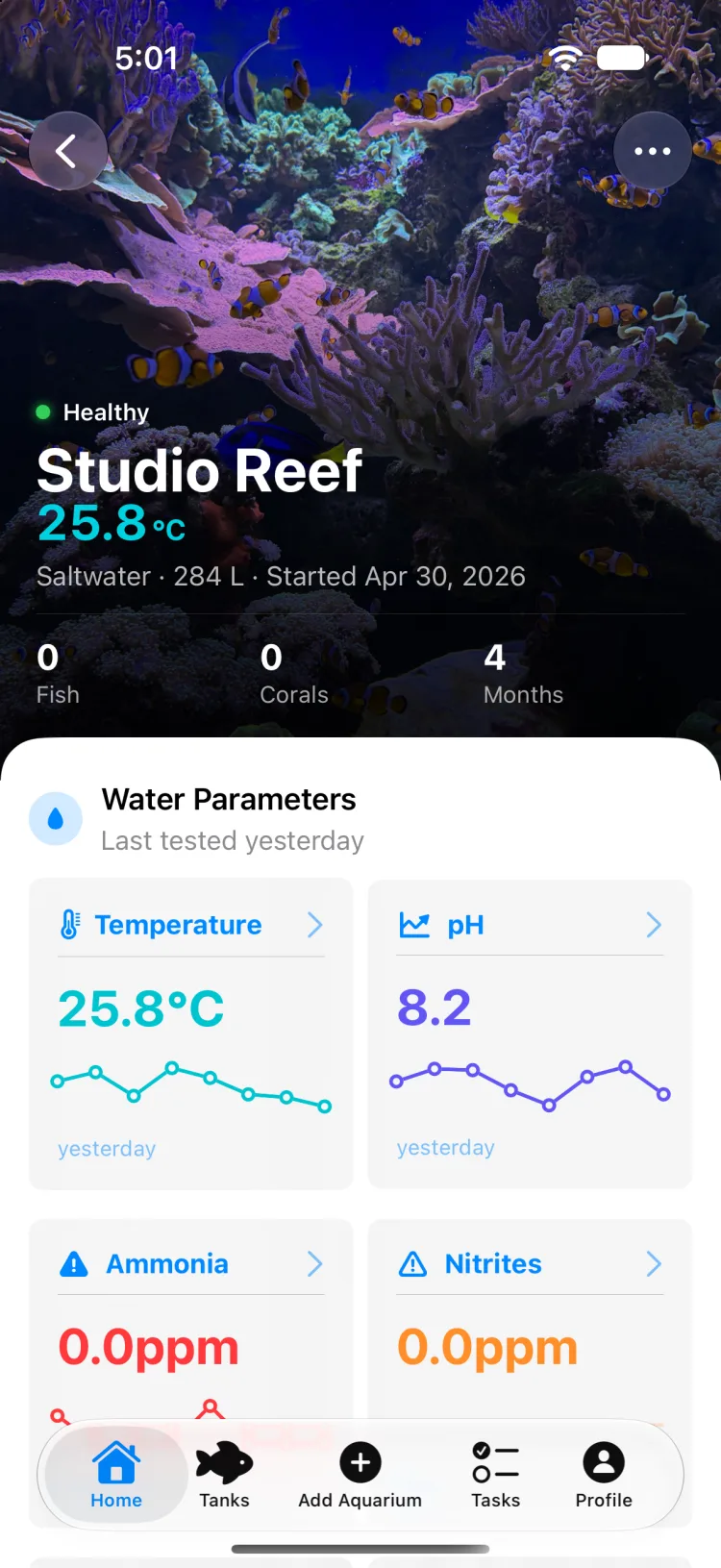
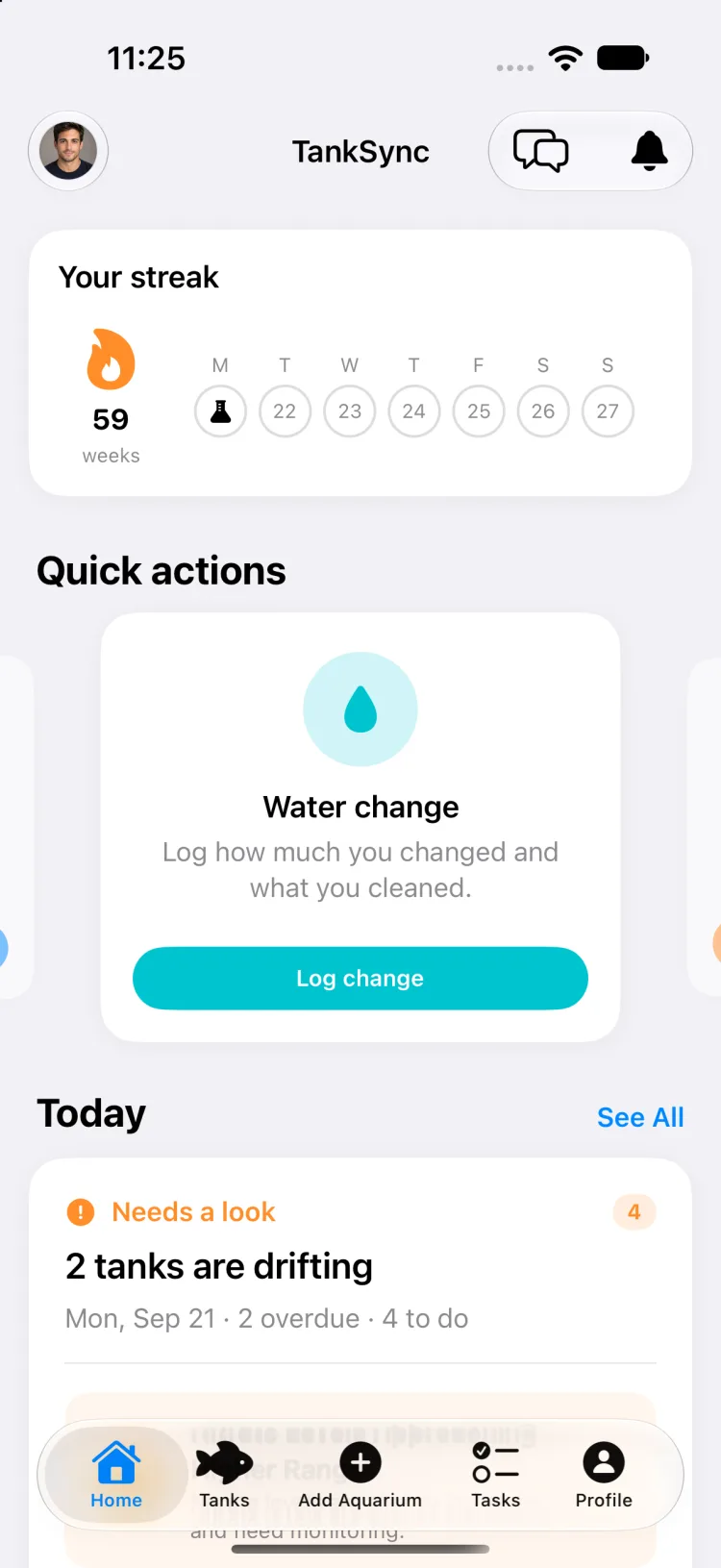
TankSync dashboard showing tank health, the latest water parameter readings and upcoming maintenance

The problem

Nothing in an aquarium fails suddenly. It drifts.

The nitrate creeps up two weeks running. The heater has not been checked since spring. The water change that was supposed to be every Sunday quietly became every other Sunday, then whenever the glass looked cloudy. Test strips go in a drawer, results go in your head, and by the time something is visibly wrong the record of how it got there is gone.

TankSync keeps the numbers and the schedule in the same app. Every reading is charted against its safe range. Every task recurs on its own. When a parameter starts moving, you see the line before you see the algae.

10

Water parameters tracked

850+

Species in the library

8

Maintenance categories

0

Accounts to create

How it works

Set it up once, then just log the tests.

The whole point is that the routine stops depending on you remembering the routine.

  1. 01

    Add the tank

    Volume, and whether it is freshwater, saltwater or brackish. That one choice sets the safe range for every parameter, so the app knows a pH of 8.2 is right for a reef and wrong for a community tank.

  2. 02

    Log a test

    Enter whatever you measured — all ten parameters or just ammonia. Each reading lands on a chart against its safe band, and the tank health score updates immediately.

  3. 03

    Schedule the work

    Water changes, filter media, equipment checks, dosing. Set the interval once and the task regenerates itself on completion, with a local reminder when it is due.

  4. 04

    Check before you buy

    Look a species up in the library, read the care level and requirements, and run a compatibility check against what is already swimming in there before you commit to it.

Features

Everything the notebook was supposed to do.

Water parameters

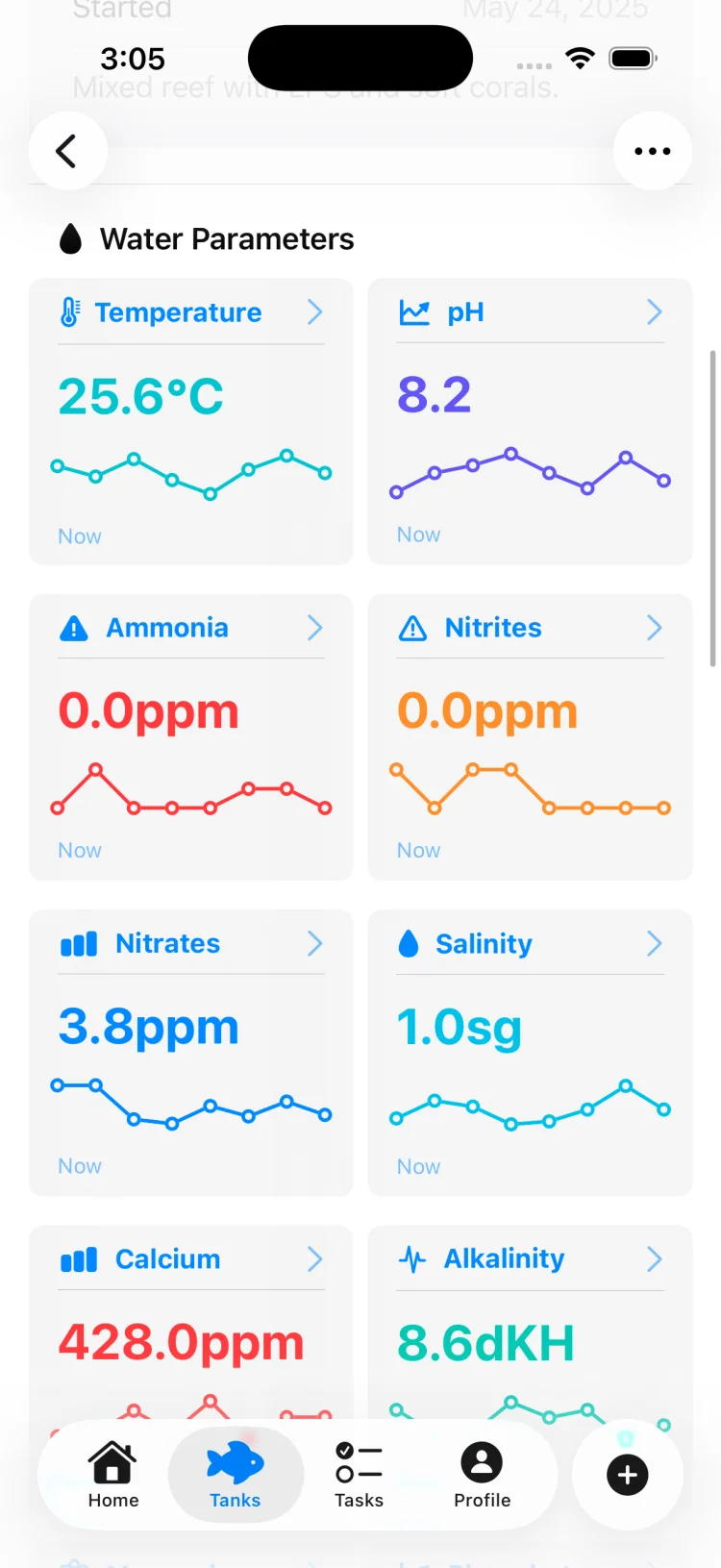
Ten readings, each against the range that applies to your tank.

  • Temperature, pH, ammonia, nitrite, nitrate, salinity, calcium, alkalinity, magnesium and phosphate
  • Safe ranges adapt to freshwater, saltwater or brackish — pH targets 6.5–7.5 in freshwater and 8.1–8.4 in saltwater
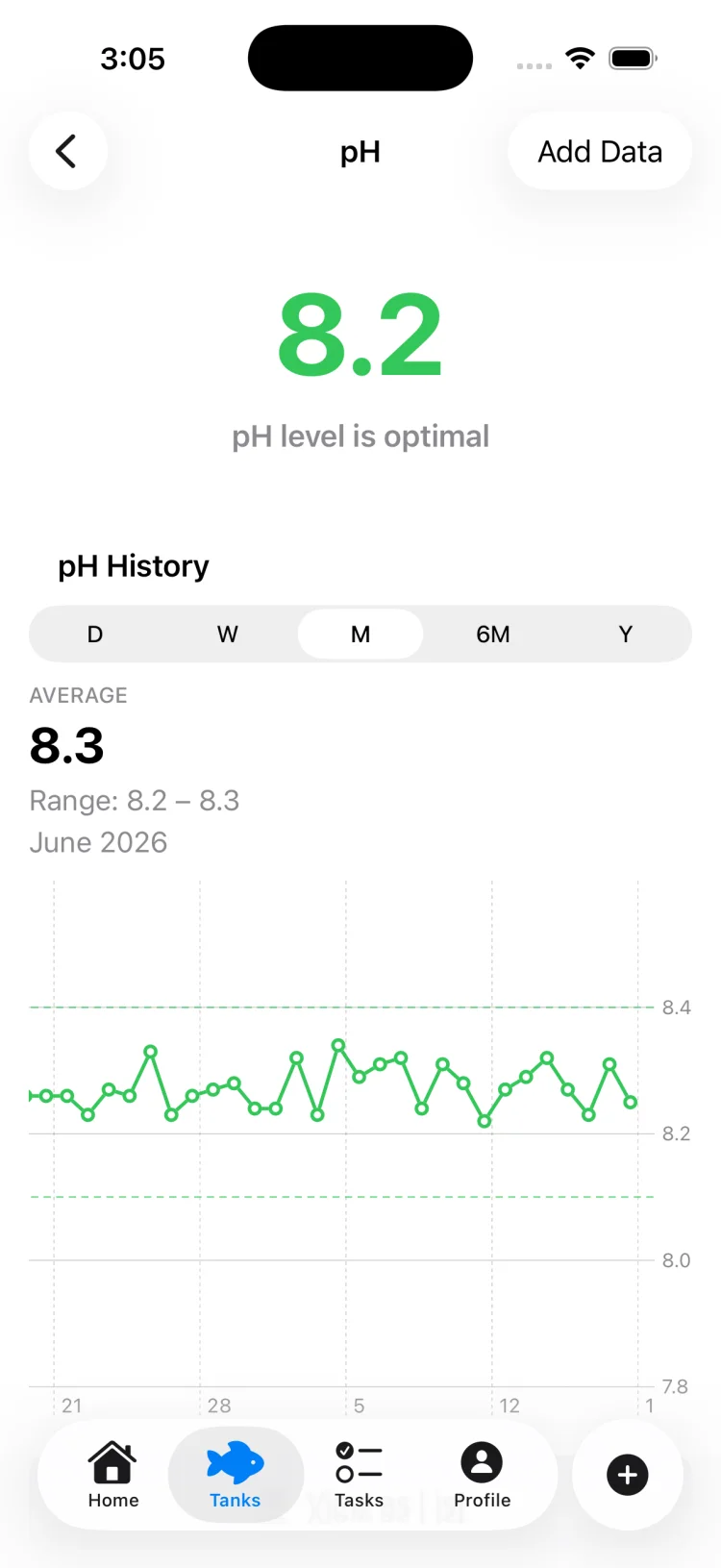
  • Trend charts across day, week, month, six month and year windows, built with native Swift Charts
  • Tap any point on a chart to read the exact value and date, with average, minimum and maximum for the visible window
  • Imperial or metric throughout — gallons and Fahrenheit, or litres and Celsius
The aquarium water parameters guide
TankSync pH history chart plotting readings over time against the safe range band

Tank health

One number that tells you where to look.

  • A rule-based score out of 100 — computed on device, instantly, with no waiting on a server
  • Water chemistry carries 40 percent of the weight, stocking and bioload 25 percent, maintenance 20 percent and cycling progress 15 percent
  • Points come off for readings outside the safe band, overdue tasks, a late water change or an incomplete cycle
  • The breakdown shows which category cost you the points, so the score is a diagnosis rather than a grade
  • Updates the moment you log a test or complete a task
When a healthy tank goes wrong
TankSync tank health screen showing a score of 100 rated excellent with the contributing categories listed

Species library

850+ entries, bundled with the app.

  • 173 freshwater fish, 179 saltwater fish, 61 freshwater invertebrates, 126 saltwater invertebrates, 82 corals and 40 aquatic plants
  • Every entry carries a scientific name and a care level from beginner through to expert
  • Saltwater fish and invertebrates are flagged for reef safety; invertebrates note whether they need a symbiotic partner
  • Corals list their type — SPS, LPS, soft, gorgonian and more — with flow, lighting demand and a minimum tank age
  • Plants list lighting demand, growth rate and whether they need injected CO₂
Beginner fish worth starting with
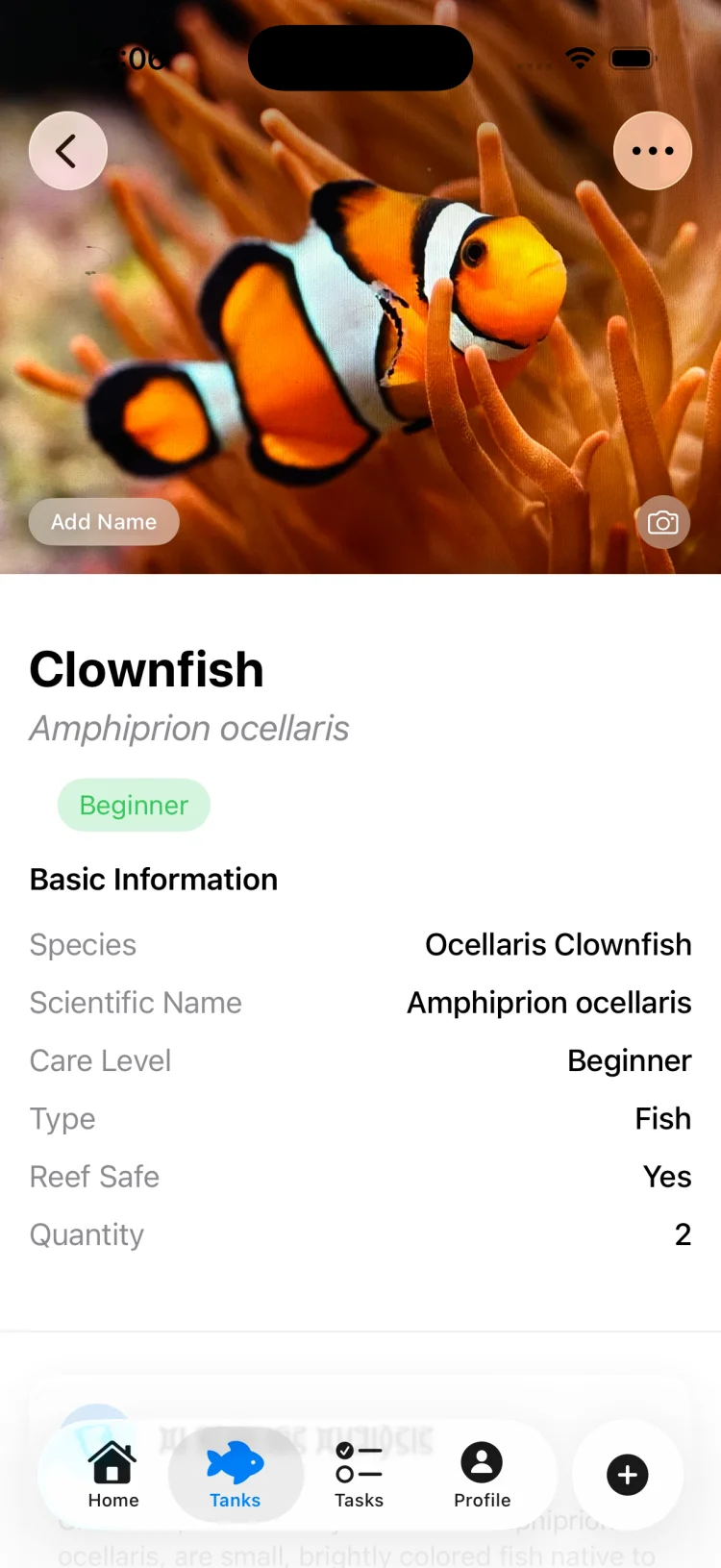
TankSync species profile for a clownfish showing scientific name, care level and tank requirements

Compatibility

Ask before you buy, not after the lights go out.

  • Score a candidate species from 0 to 100 against the fish, inverts and corals already in the tank
  • Conflicts are broken out by cause — aggression, territory, size mismatch, competing diets and incompatible water parameters
  • Each conflict is rated low, medium or high, and names the specific tank mate it applies to
  • A bioload read on the tank flags whether you are under, optimal, near capacity or overstocked
  • Recommendations are separated into requirements, warnings and suggestions so you can tell must-fix from nice-to-have
The fish compatibility guide
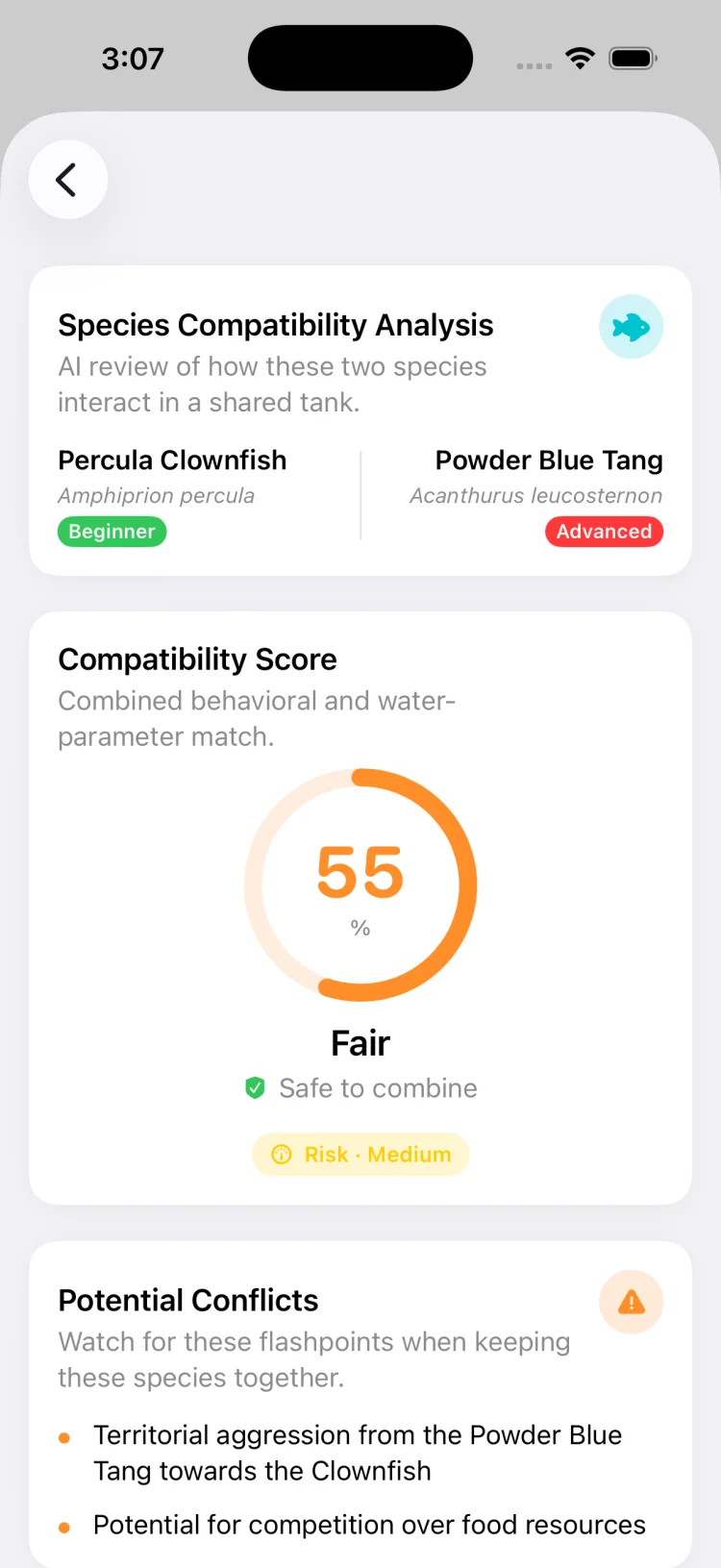
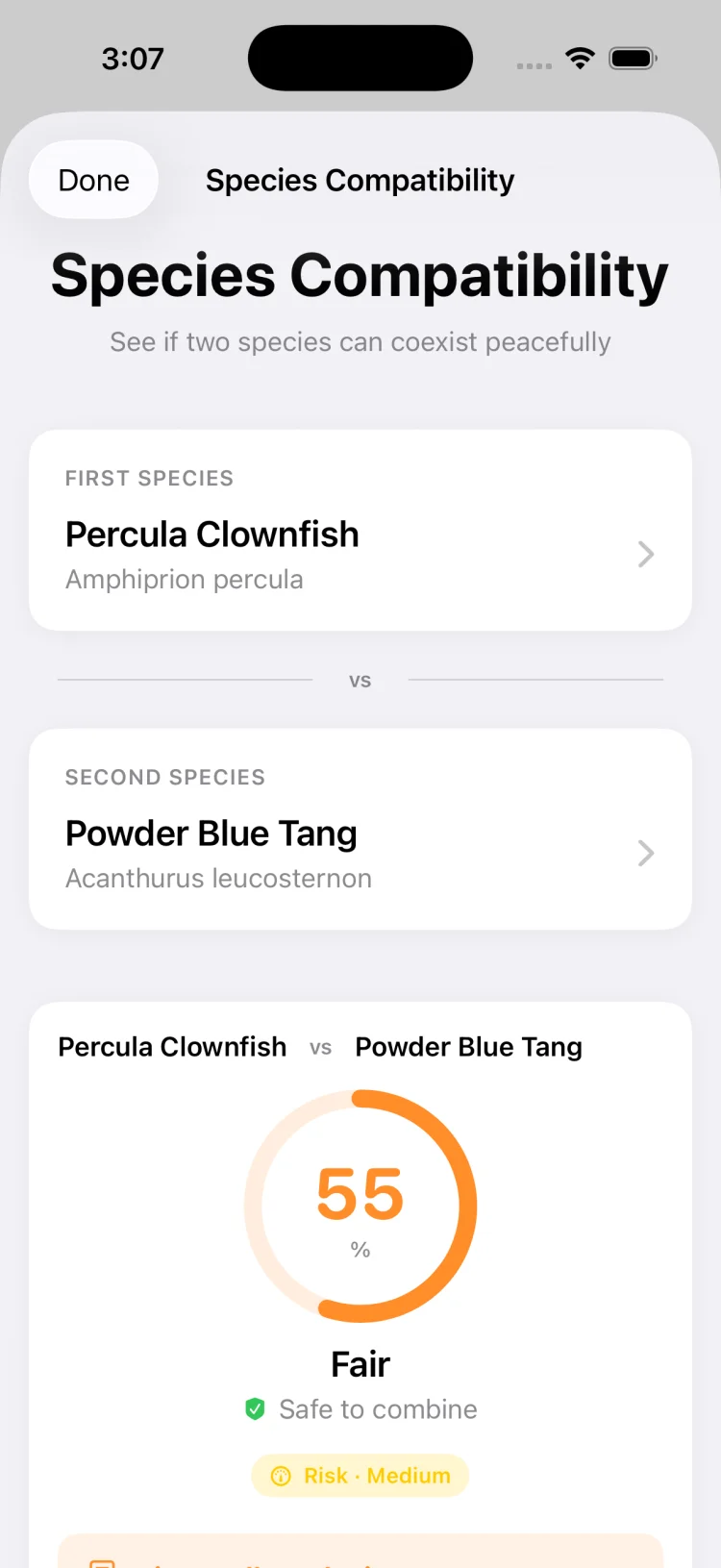
TankSync compatibility result showing an overall score with individual conflicts listed by severity

Maintenance & equipment

The schedule keeps itself.

  • Eight task categories: water change, water test, filter maintenance, equipment check, feeding, cleaning, medication and other
  • Repeat daily, weekly, fortnightly, monthly or on a custom interval — completing a task generates the next one
  • Local reminders when a task falls due, and clear overdue flagging when it does not get done
  • Equipment tracked across eight types with its own service frequency and a status of good, upcoming, due or overdue
  • Water changes write a log entry with volume and percentage, building a history you did not have to keep
A maintenance schedule that holds up
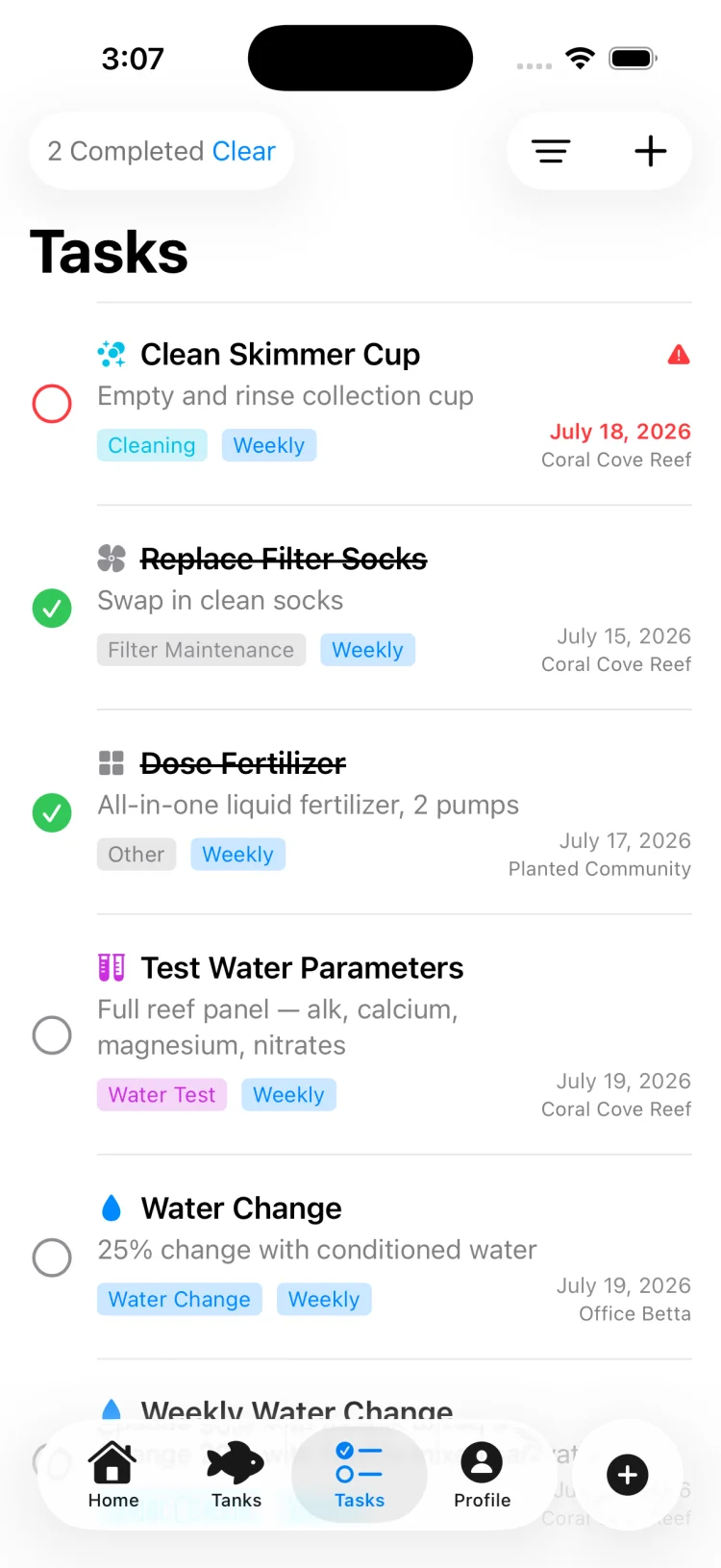
TankSync maintenance task list showing recurring water changes, filter service and equipment checks with due dates

AI tools · Pro

Point the camera at a fish and find out what it is.

  • Photo identification returns ranked candidates with confidence scores, common and scientific names, water type and care level
  • Matches against the bundled catalogue where it can, so an identified fish links straight through to its full profile
  • Parameter insights read your actual history and explain what a trend means rather than restating the number
  • A tank assistant that answers questions with your parameters, stock list and equipment already in context
  • Cycling analysis reads your test results to predict completion and flag a stall
How to cycle a fish tank
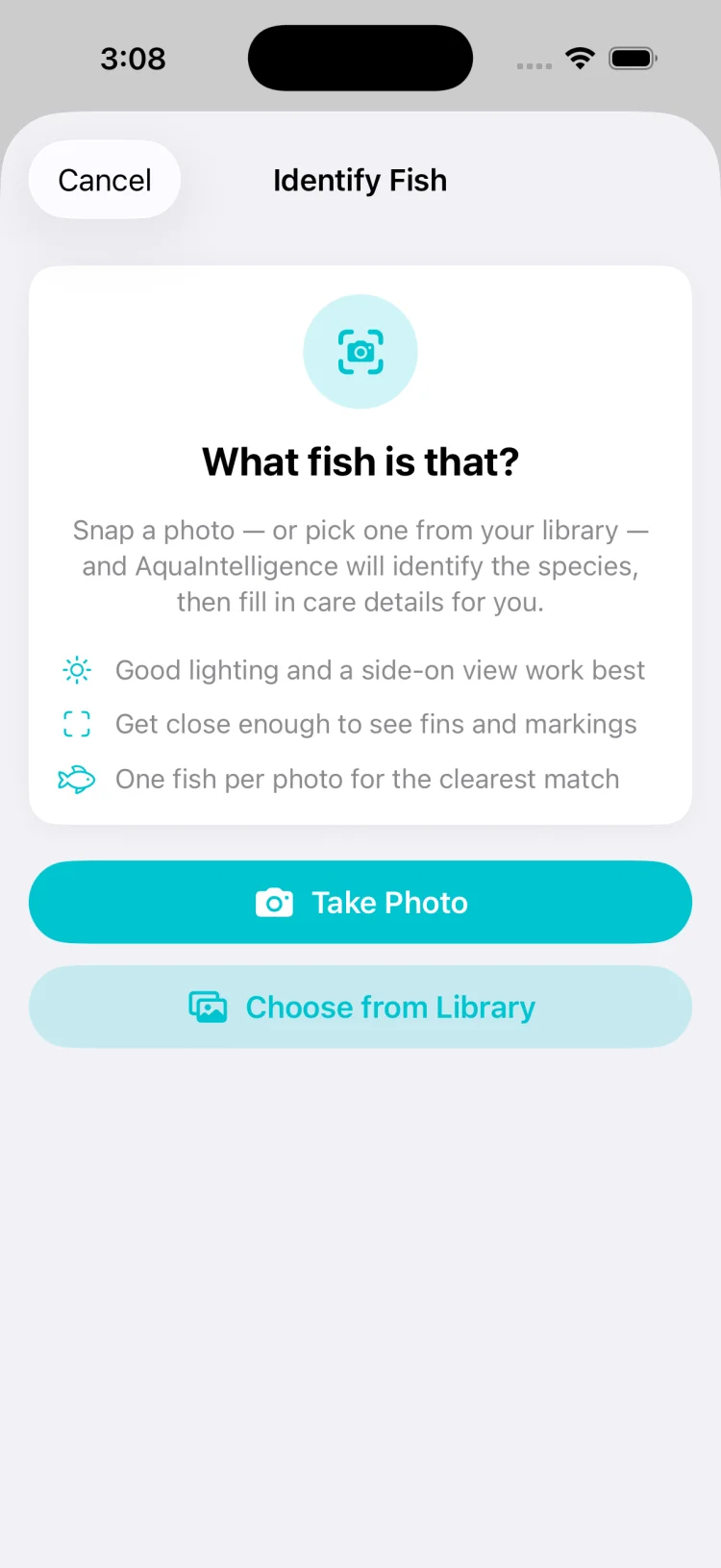
TankSync AI fish identification screen returning candidate species from a photo with confidence scores

Sync & storage

Your iCloud. Not our server.

  • No TankSync account — no email, no username, no password, nothing to verify
  • Tanks, readings, photos and journals live in your own private iCloud database and appear on every device on your Apple ID
  • Works offline; changes queue up and sync when the connection comes back
  • Photos are stored at full resolution with thumbnails cached locally so lists stay fast
  • iPhone and iPad, both from the same download
Read the privacy policy
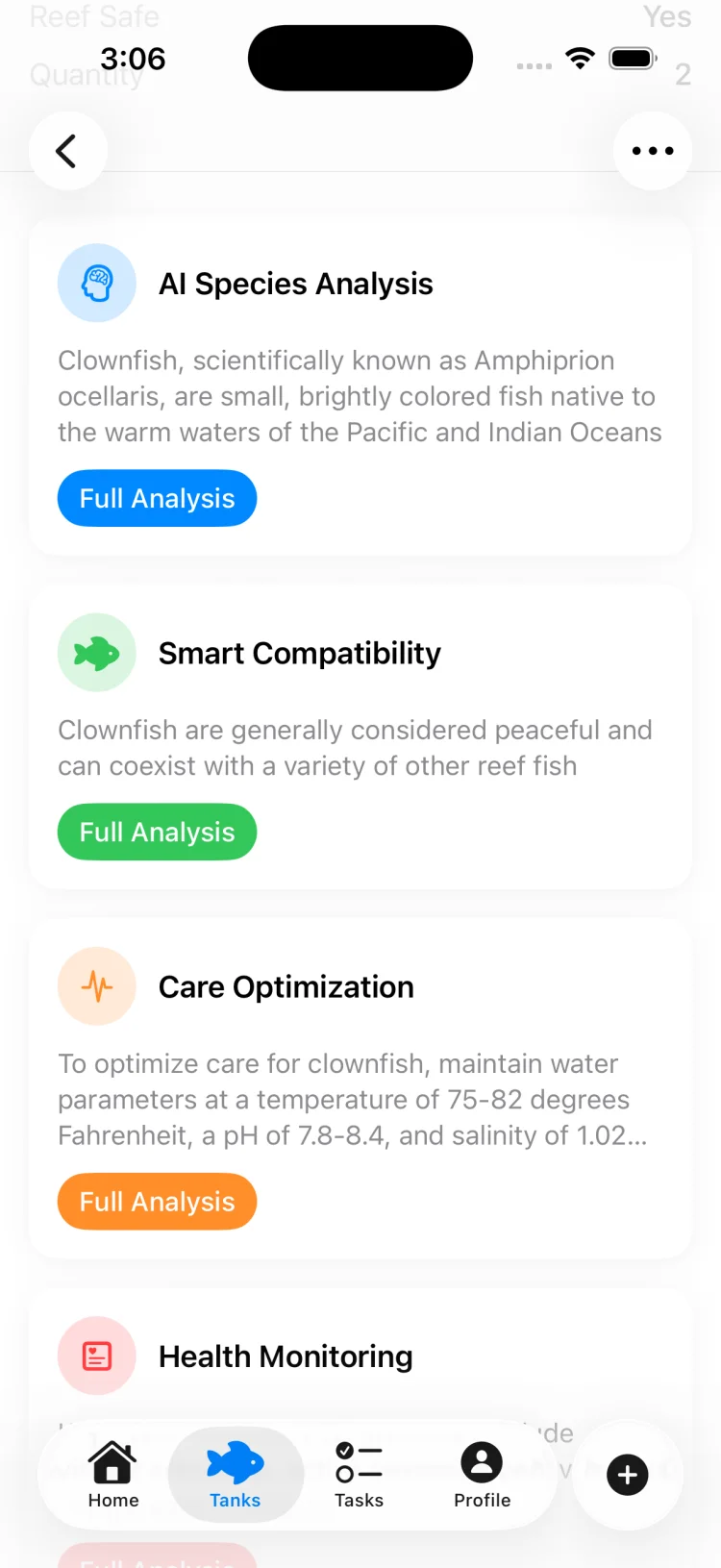
TankSync species analysis screen giving care guidance for a fish in the context of the current tank

Screenshots

A look inside the app.

The screens you would use on a normal Sunday morning.

TankSync dashboard with tank health, latest parameters and upcoming maintenance in one view
Tank dashboard
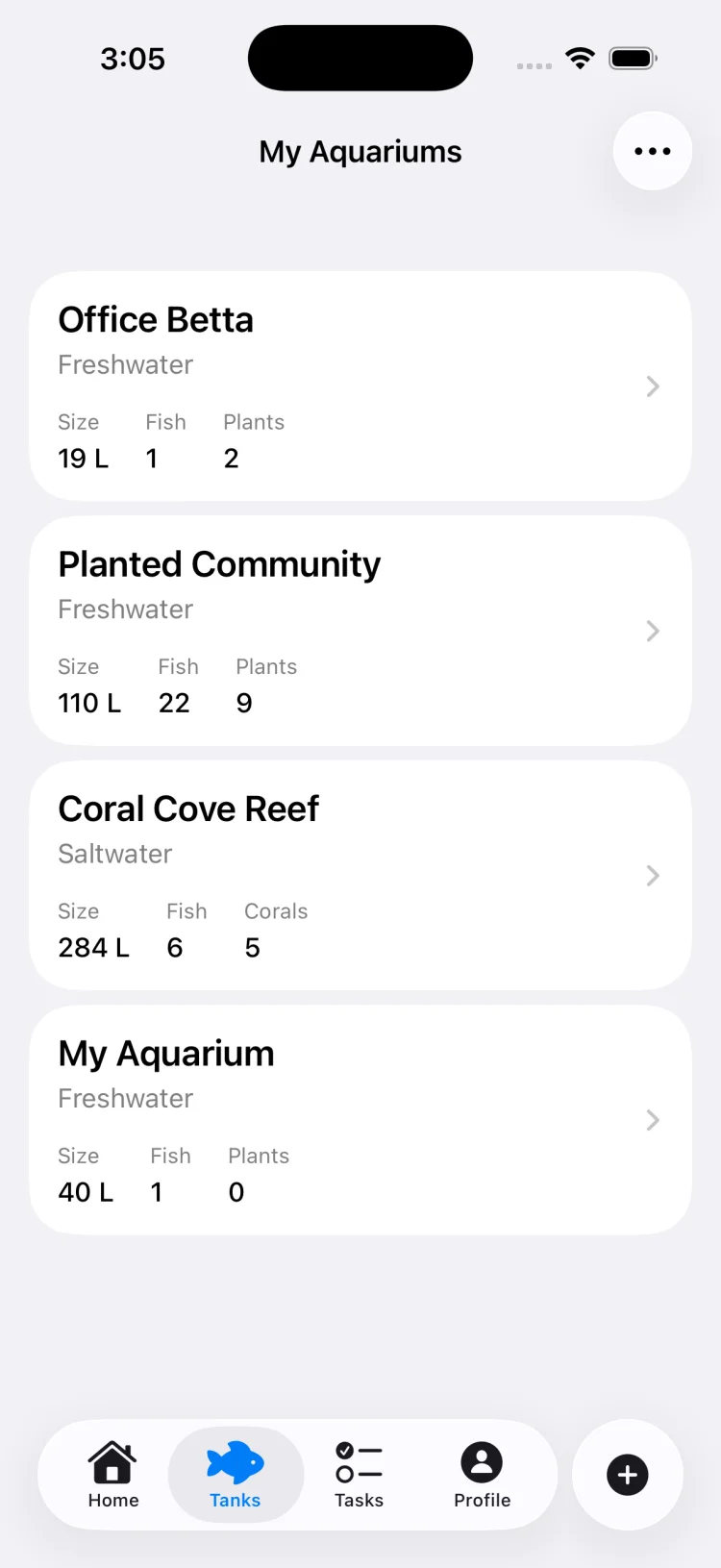
TankSync aquarium list with multiple freshwater and saltwater tanks
Every tank you keep
TankSync tank health score screen rating the aquarium out of 100
Health score
TankSync water parameter grid with each reading shown against its safe range
All ten parameters
TankSync pH trend chart across a selectable time range
Trends over time
TankSync maintenance list with recurring tasks and due dates
Maintenance schedule
TankSync species profile page for a clownfish with care requirements
Species profiles
TankSync compatibility checker selecting a species to test against the current stock list
Compatibility check
TankSync compatibility results listing conflicts by type and severity
Conflicts, by cause
TankSync AI identifying a fish species from a photograph
Identify from a photo
TankSync AI species analysis giving care guidance for a fish in the context of the tank
Species analysis

Download

Free for your first tank. Pro when you outgrow it.

The free app gives you one aquarium with full parameter logging, trend charts, maintenance scheduling, the species library, the cycling dashboard and the journal. TankSync Pro lifts the tank and equipment limits and adds the AI tools — photo identification, compatibility analysis, parameter insights and the tank assistant.

Download on the App Store

Free download · Pro from $4.99/month or $39.99/year
3-day free trial · Requires iOS 18.0 or later

Who it's for

Anyone who owns a test kit.

First tank

The cycling dashboard walks the nitrogen cycle from the first ammonia spike to a finished tank, and the care levels tell you which fish will forgive a beginner's mistakes.

Reef keepers

Calcium, alkalinity, magnesium and phosphate charted alongside the basics, with reef safety flags on every saltwater species and flow and lighting demand on every coral.

Multiple tanks

Separate parameters, stock lists, equipment and schedules for each tank, with Pro removing the limit entirely — a fish room's worth if that is what you have.

Data keepers

If you already write readings in a spreadsheet, this is the same discipline with charts, safe-range overlays and a photo journal attached to each tank.

About the reference content

TankSync's species data, disease library and AI features are reference material, not veterinary advice. Care requirements vary by locality, source, individual animal and tank history, and the numbers in any care sheet — this app's included — are starting points rather than guarantees.

Verify anything important against your own test results, your retailer and an aquatic vet where the animal's health is at stake. AI-generated identifications, compatibility scores and insights are suggestions produced from limited context and can be wrong.

Guides

Aquarium guides.

Practical writing on the things that actually decide whether a tank works — cycling, water chemistry, stocking, maintenance intervals and what to do when the numbers go wrong.

FAQ

Questions people actually ask.

What does an aquarium manager app actually do? +

It replaces the notebook, the whiteboard and the calendar reminders you set once and then ignored. TankSync stores every water test you run, charts the readings over time so you can see a parameter drifting before it becomes a problem, and keeps recurring maintenance on a schedule with reminders.

It also holds a reference library of 850+ species, so you can check what a fish needs before you buy it rather than after.

See the maintenance guide →

Which water parameters can TankSync track? +

Ten: temperature, pH, ammonia, nitrite, nitrate, salinity, calcium, alkalinity, magnesium and phosphate.

Each one has a safe range that changes with the tank type you set, so a pH of 8.2 reads as normal in a reef tank and as high in a community freshwater tank. Every reading is charted over day, week, month, six month and year windows.

Read the parameters guide →

How many fish species are in the database? +

More than 850 entries: 173 freshwater fish, 179 saltwater fish, 61 freshwater invertebrates, 126 saltwater invertebrates, 82 corals and 40 aquatic plants.

Each entry carries a scientific name and a care level, with reef safety flags on saltwater species and invertebrates, and lighting, flow and minimum tank age on corals. The whole library ships inside the app, so it works with no connection.

Beginner species worth keeping →

Does TankSync work for saltwater and reef tanks? +

Yes. Set the tank to saltwater and the safe ranges shift to reef targets, the calcium, alkalinity, magnesium and phosphate parameters become the ones that matter, and the species library exposes the saltwater fish, invertebrate and coral catalogues along with reef safety flags.

Freshwater, saltwater and brackish tanks each get their own parameter ranges.

Read the reef parameters guide →

How is the tank health score calculated? +

It is a rule-based score out of 100, not a guess. Water parameters carry the most weight at 40 percent, stocking and bioload account for 25 percent, maintenance status is 20 percent, and cycling progress is the remaining 15 percent.

Points come off for readings outside the safe range, overdue tasks, a water change that is late, and an incomplete nitrogen cycle. The calculation runs on the device, so it updates the instant you log something.

Is TankSync free? +

The app is free to download and includes one aquarium with water parameter logging, maintenance scheduling, the species library, the cycling dashboard and the journal.

TankSync Pro removes the tank and equipment limits and unlocks the AI features — photo identification, compatibility analysis, parameter insights and the tank assistant. Pro is $4.99 per month or $39.99 per year, with a 3-day free trial.

Download TankSync →

Does my data sync between iPhone and iPad? +

Yes, through your own iCloud account. There is no TankSync account, no username and no password to create.

Your tanks, readings, photos and logs live in your private CloudKit database and appear on any device signed into the same Apple ID. The app works offline and syncs when the connection returns.

Read the privacy policy →

Can TankSync identify a fish from a photo? +

Yes, with Pro. Point the camera at a fish and the identifier returns ranked candidates with confidence scores, common and scientific names, water type and care level.

When the result matches something in the 850+ entry catalogue it links straight to the full species profile so you can add it to a tank in one step. Treat the result as a suggestion — confirm anything that matters before acting on it.

Will TankSync remind me to do water changes? +

Yes. Maintenance tasks come in eight categories including water changes, water tests, filter maintenance and equipment checks, and each can repeat daily, weekly, fortnightly, monthly or on a custom interval.

Completing a task schedules the next one and, for water changes, writes a log entry with the volume and percentage so the history builds itself.

Read the water change guide →

Does TankSync help with cycling a new tank? +

There is a dedicated cycling dashboard that tracks the nitrogen cycle from ammonia building through nitrite building to nitrate and completion. Log your test results and it detects the milestones — first ammonia spike, first nitrite spike, cycle complete.

There is a journal for notes alongside it, and optional reminders to test on schedule so the readings do not develop gaps.

Read the cycling guide →

Stop guessing.
Start logging.

Ten parameters, 850+ species and a maintenance schedule that keeps itself. Free on the App Store.