Code Blue Timer & Event Log

Two clocks.
One screen.

A practice and training tool for mock codes and resuscitation rehearsal. Run both timers at once, log medications and procedures with adjustable steppers, and review the timestamped PDF afterwards. No account. No cloud. Everything stays on the device.

  • Works fully offline
  • Nothing leaves the device
  • $4.99 once
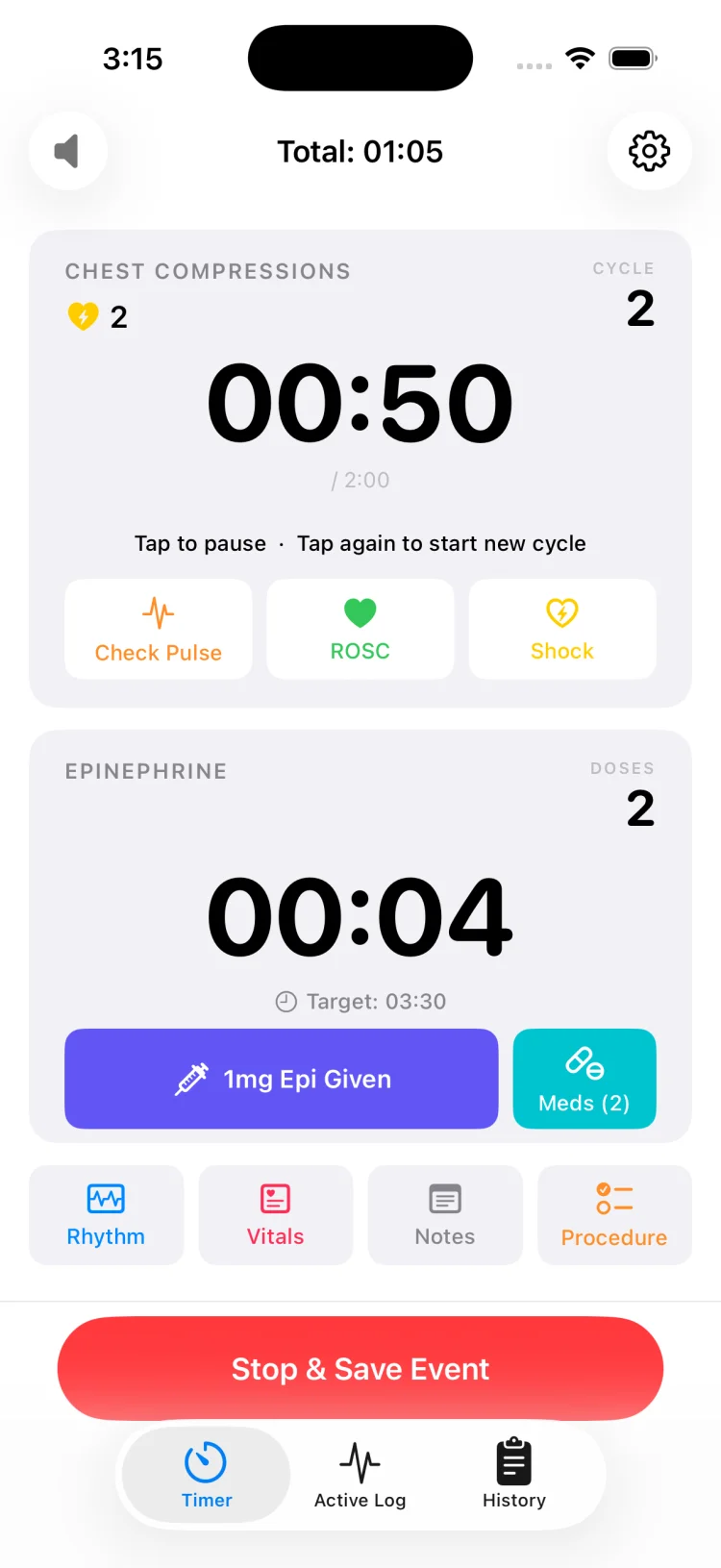
MedCode main screen with the compression cycle timer and the epinephrine interval timer running together

The problem

The times get reconstructed afterwards. From memory.

Somebody is watching the wall clock. Somebody else is counting doses on their fingers. The recorder is writing on a paper form while the team leader asks how long it has been. Then, after the mock code ends, the record gets written up from memory — and the timestamps become best estimates rounded to the nearest minute.

MedCode helps keep the clock and the record in the same place. Both timers run on one screen. Every entry is stamped with clock time and elapsed time as it happens. When the session ends, the timeline is ready to review.

30

Medications, one tap each

9

Rhythms loggable

11

Procedures tracked

0

Bytes sent anywhere

Download

$4.99 once. That's the whole pricing page.

One-time purchase, every feature included. No subscription, no pro tier, no in-app purchases, no ads, no account to create. Buy it, and it works — including in a basement with no signal.

Download on the App Store

$4.99 one-time purchase
Requires iOS 18.6 or later

How it works

Four steps, and none of them need a free hand for long.

MedCode is built for someone holding a phone in a crowded room while trying to listen to the team leader.

  1. 01

    Start the event

    One tap starts the session clock. The compression cycle timer and the epinephrine interval timer both begin, and every entry from this point carries an elapsed offset from time zero.

  2. 02

    Watch the two clocks

    The compression timer alerts at two minutes for the rhythm and pulse check. The epinephrine timer alerts at the interval you set. Audio plays over the silent switch, and haptics repeat until someone acknowledges them.

  3. 03

    Tap what happens

    Medication, shock, rhythm change, intubation, line placed, vitals — each is a single tap from the main screen. It lands on the timeline immediately with clock time and elapsed time attached.

  4. 04

    Stop, save, export

    End the session and it saves to history on the device. Export a PDF as a full timeline or a grouped summary, then print it, email it or file it according to your institution's policy.

Features

Built around the two things that always slip.

The timers

Compressions and epi, running together.

  • Compression cycle timer with a two-minute alert for the rhythm and pulse check, plus a running cycle count
  • Epinephrine interval timer you can set anywhere from 0:00 to 10:45 in fifteen-second steps — 3:30 by default
  • Both clocks visible at once on the main screen, with no scrolling and no tab switching
  • Reset either timer independently without disturbing the other or the session clock
  • Session clock keeps running underneath so every entry stays anchored to time zero
Epinephrine timing in cardiac arrest
MedCode compression cycle timer and epinephrine interval timer displayed together with a running session clock

Metronome & alerts

Loud enough for the room, or silent enough for the hallway.

  • Metronome adjustable from 100 to 120 beats per minute, set to 110 by default
  • Audio plays over the iPhone silent switch, so a flipped ringer switch does not cost you the beat
  • Four haptic settings — off, light, medium and strong — for when audio is not appropriate
  • Alerts repeat until someone acknowledges them, rather than firing once into the noise
  • Screen stays awake for the whole session so the clocks never disappear mid-code
Why compression rate needs a metronome
MedCode main timer screen where the metronome, alert tones and haptic settings live alongside both clocks

Logging

One tap, and it's on the record.

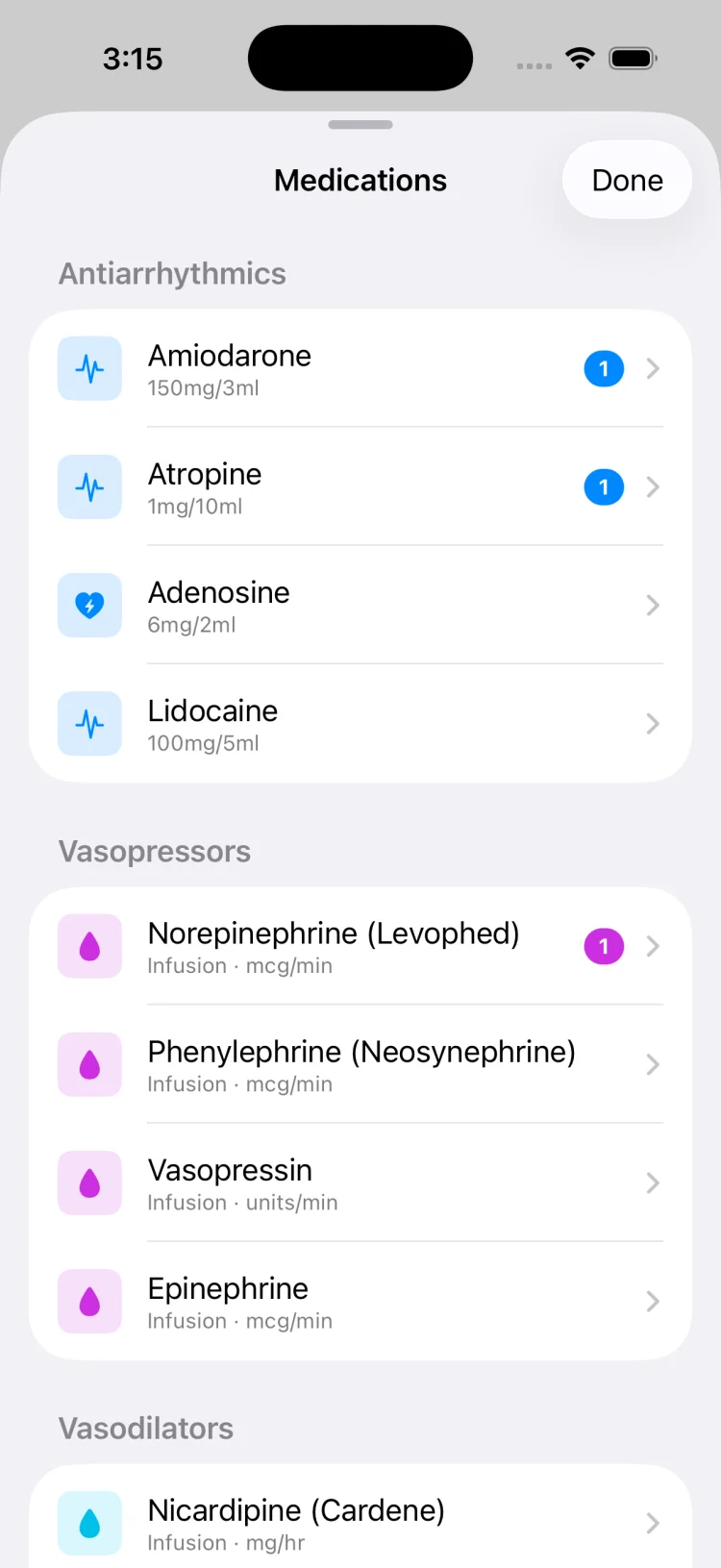
  • 30 medications in 8 categories with reference concentration labels and adjustable steppers to record the amount given — epinephrine, amiodarone, atropine, adenosine, lidocaine, calcium, bicarbonate, pressors, sedatives, paralytics and more
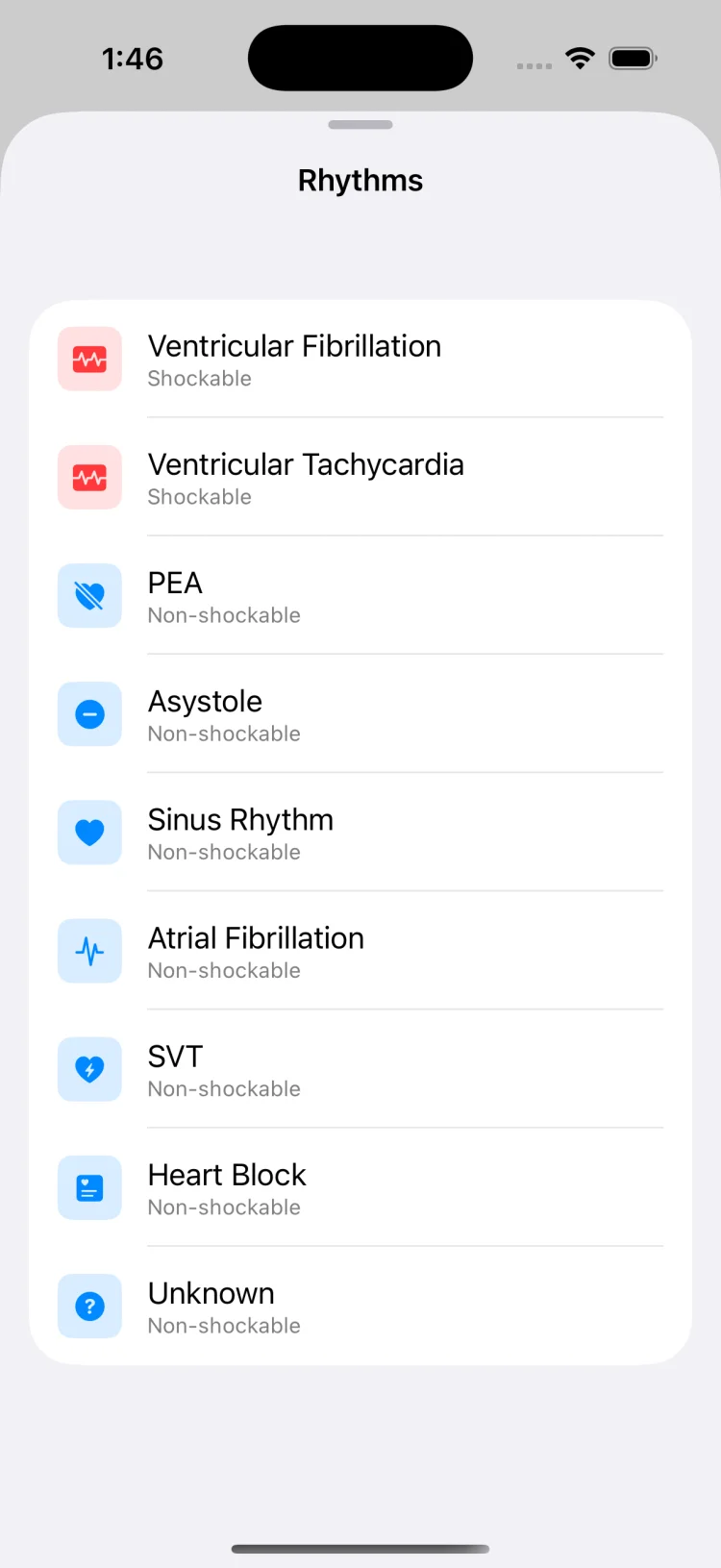
  • 9 rhythms including ventricular fibrillation, pulseless VT, PEA, asystole, sinus rhythm, atrial fibrillation, SVT and heart block
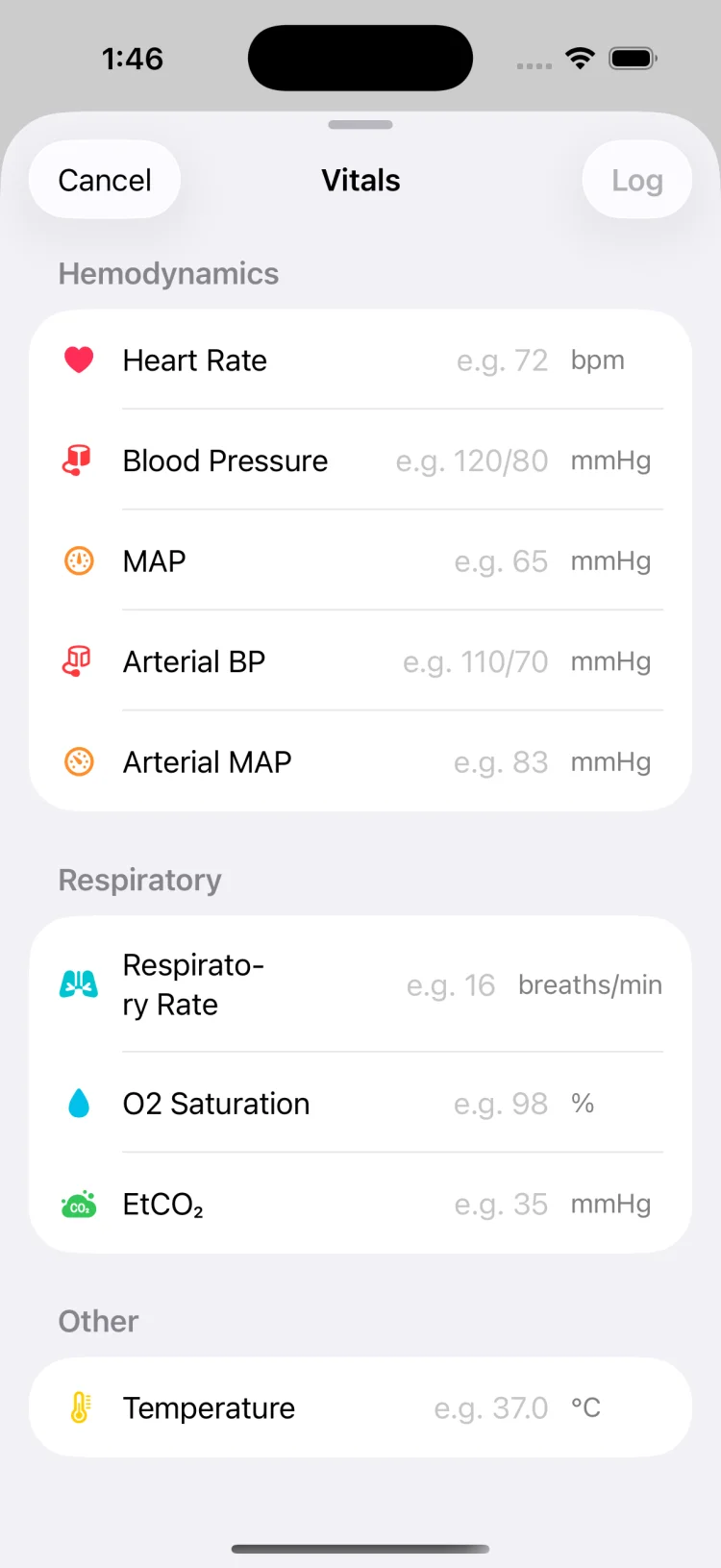
  • 9 vital fields: heart rate, blood pressure, MAP, arterial BP, arterial MAP, respiratory rate, SpO₂, EtCO₂ and temperature
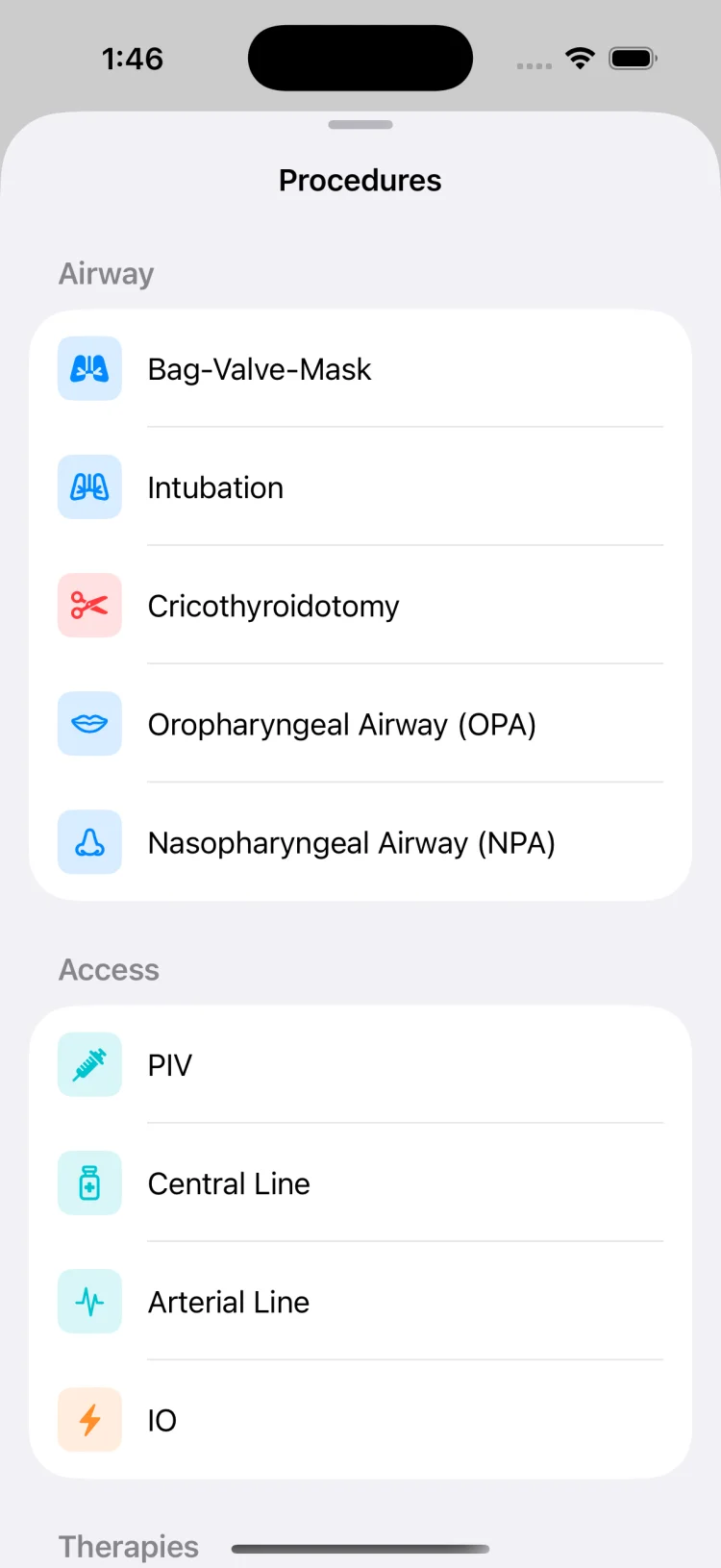
  • 11 procedures covering airway, vascular access and electrical therapy — BVM, intubation, cricothyroidotomy, OPA, NPA, PIV, central line, arterial line, IO, cardioversion and defibrillation
  • Shock logging with sequential shock number and timestamp. Free-text notes for anything else
The ACLS medications reference
MedCode medication logging screen with code drugs listed alongside their standard concentrations

The record

The timeline is ready when the session ends.

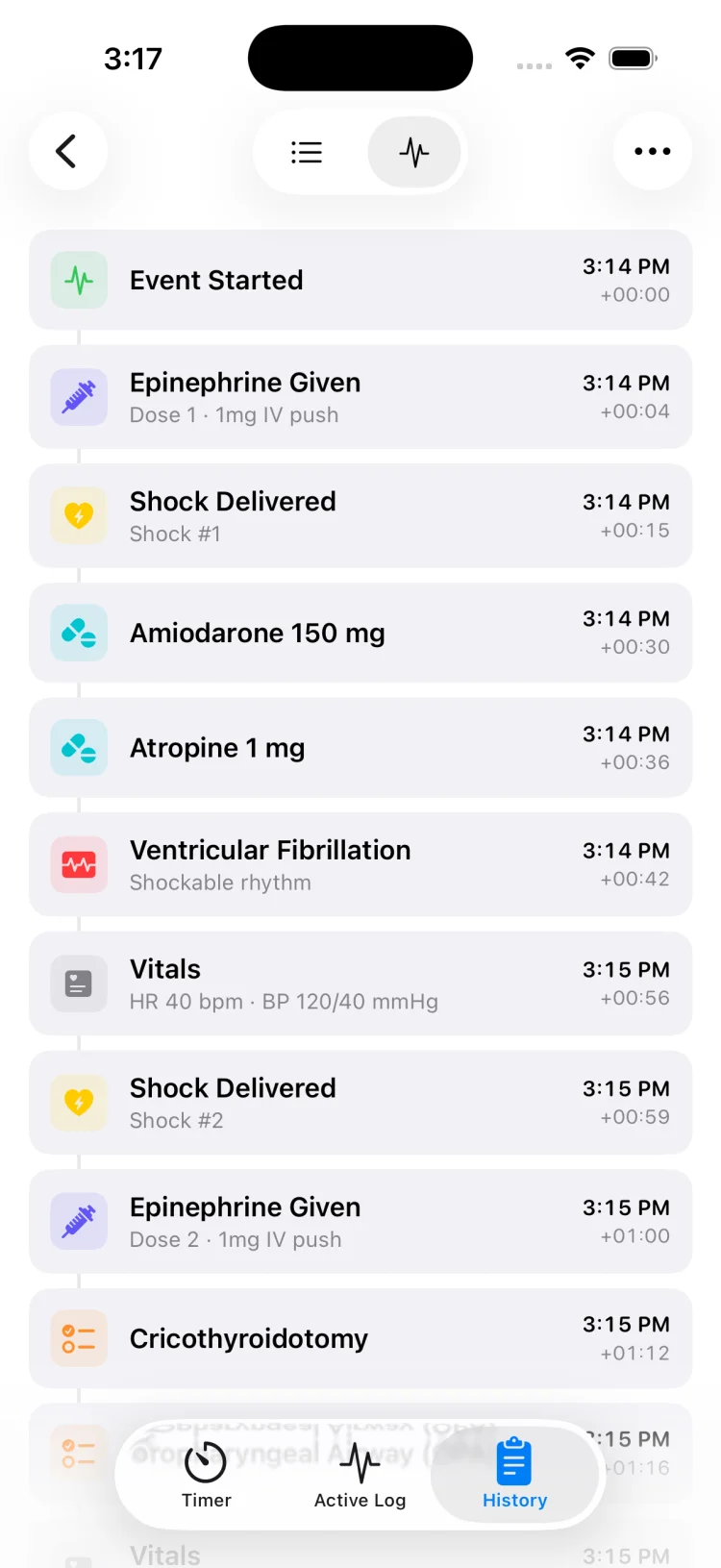
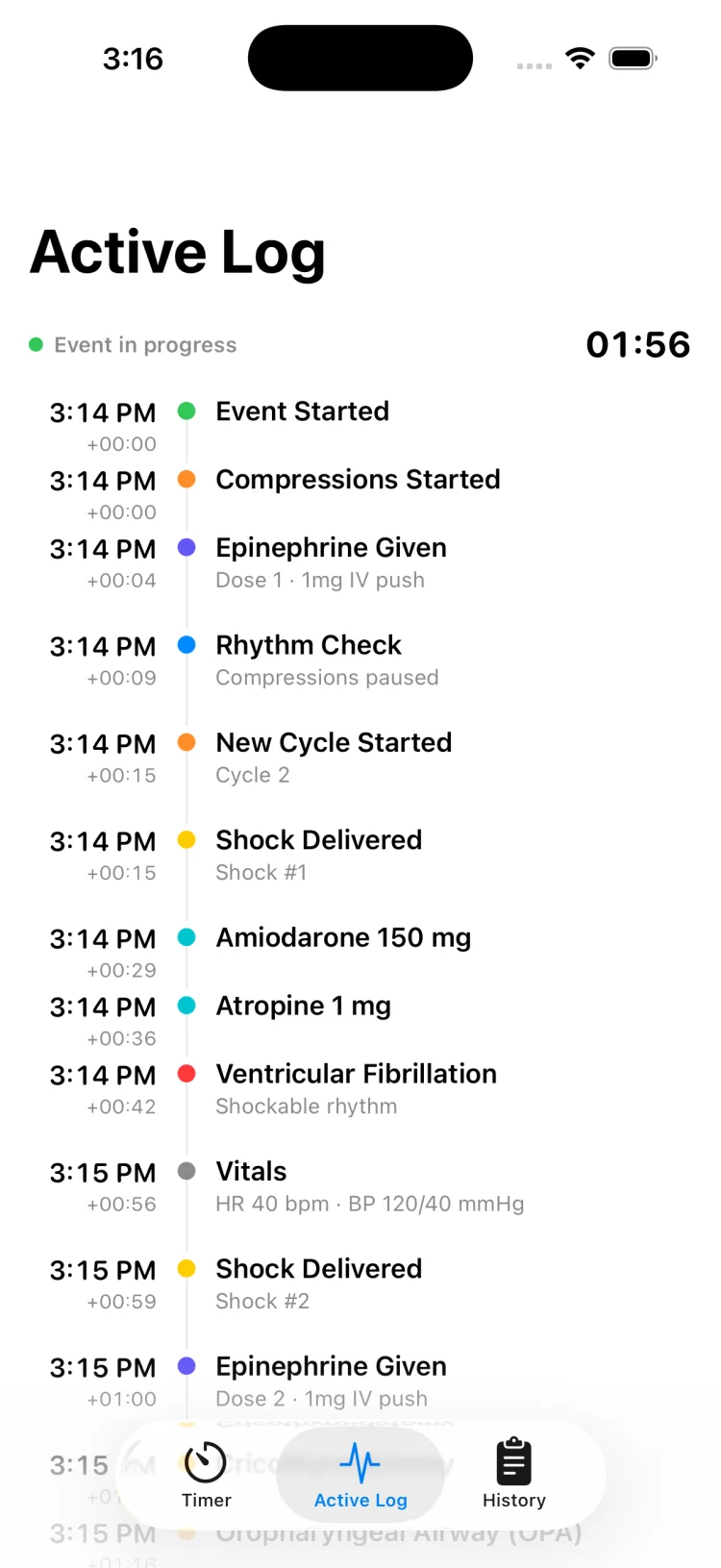
  • Live timeline during the event — scroll back mid-code to answer "how long since the last epi?"
  • Every entry carries both clock time and elapsed offset from the start of the event
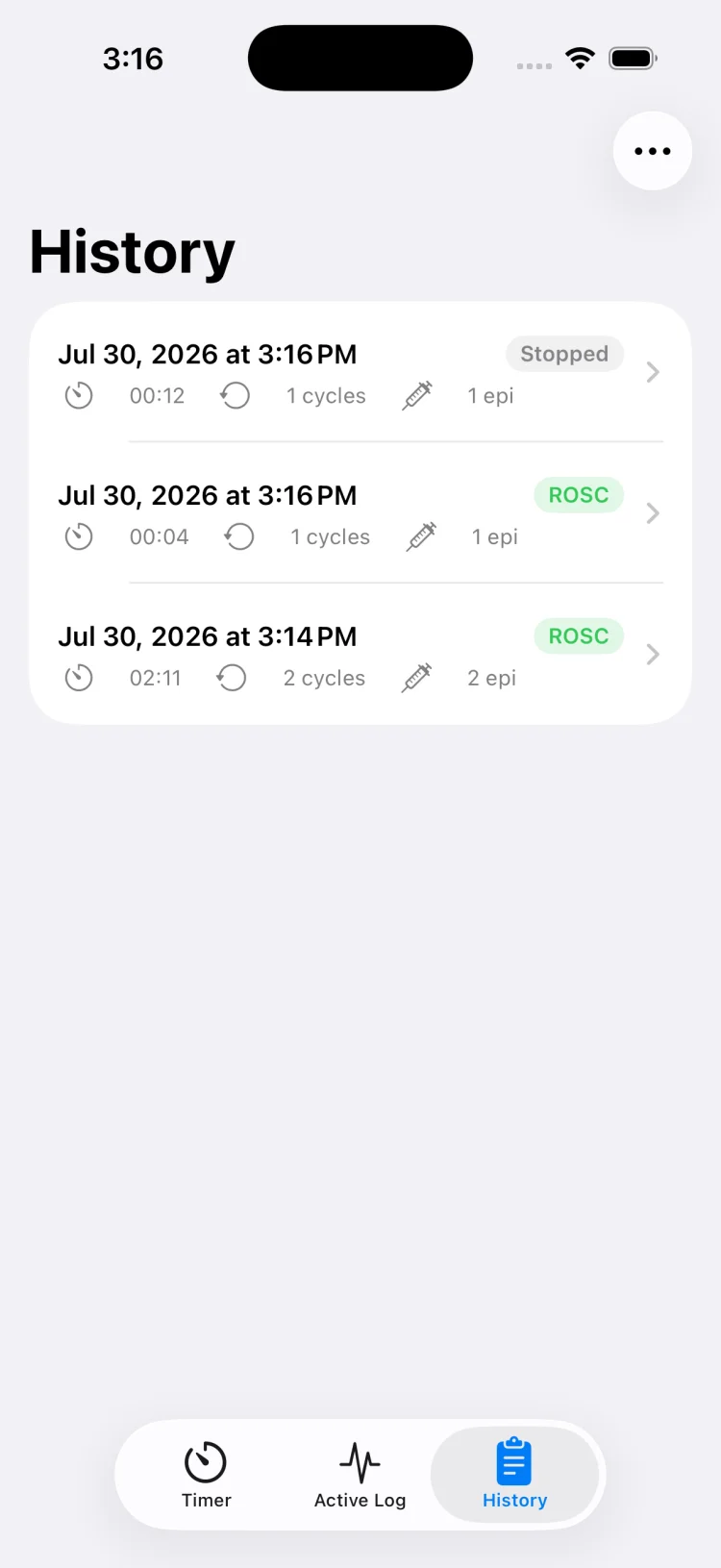
  • Session history stores past events on the device, listed by date, duration and event count
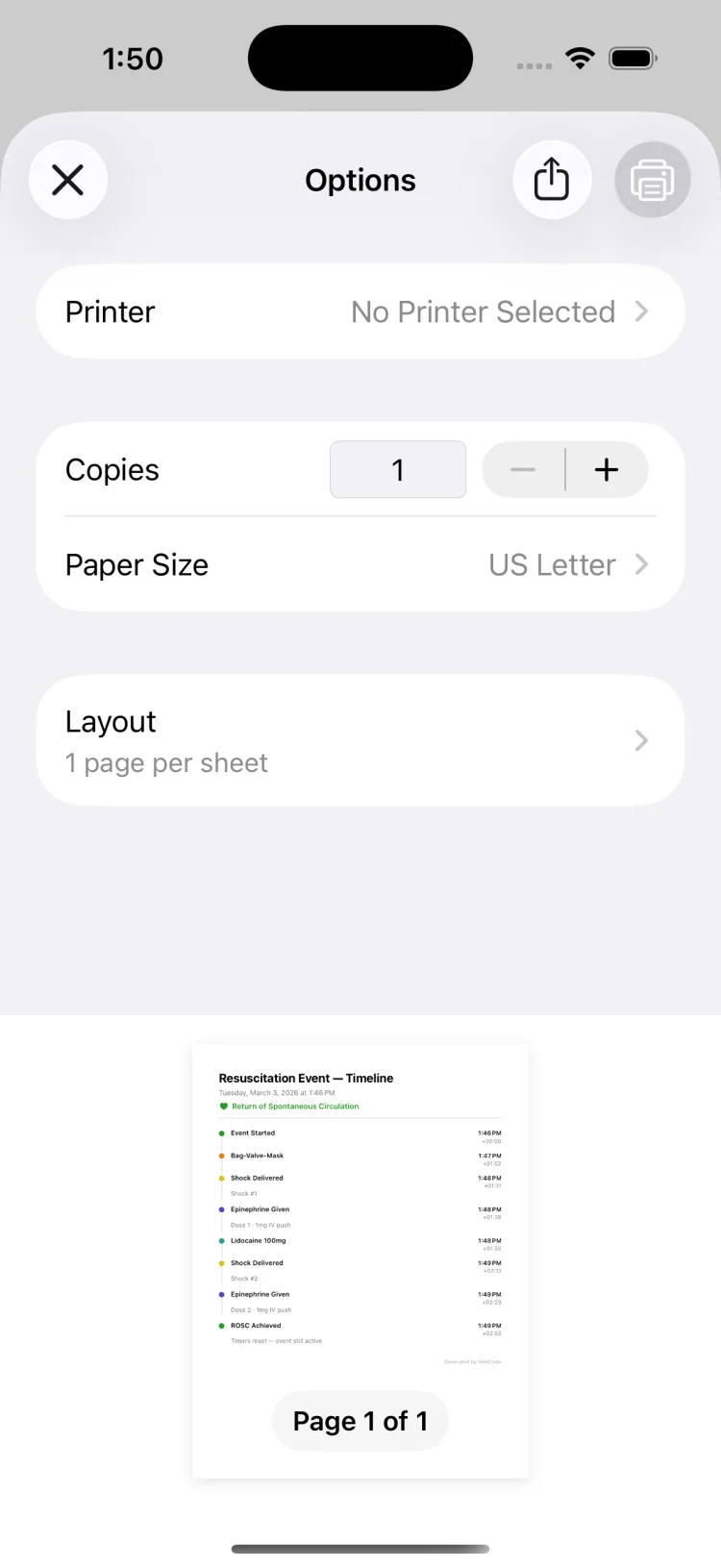
  • PDF export in two formats: a full chronological timeline, or a summary grouping medication totals, shocks and rhythms
  • Share through the standard iOS share sheet to print, email or file it
How to document a code blue
MedCode saved session timeline showing each logged event with clock time and elapsed offset

Privacy & access

Nothing to sign into. Nothing sent anywhere.

  • No account, no login, no cloud sync — sessions live on the device only
  • No analytics SDK, no crash reporting service, no ad network, no tracking
  • No patient name or identifier requested; sessions are identified by date and time
  • Works fully offline — nothing in the timing path depends on a network call
  • You control export: a PDF exists only when you create one, and goes only where you send it
Read the privacy policy
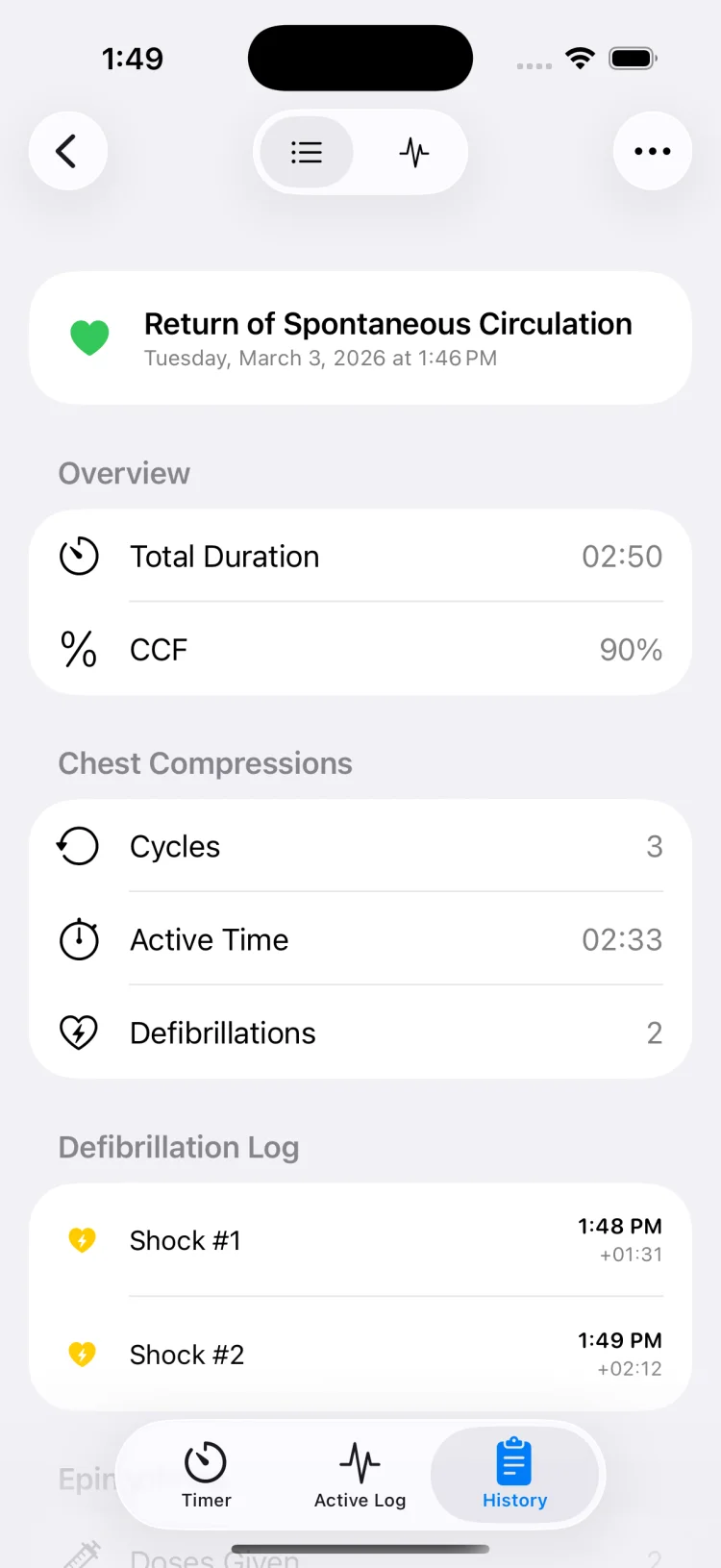
MedCode session summary screen showing totals for medications given, shocks delivered and event duration

Screenshots

A look inside the app.

The screens you would actually be looking at during an event.

MedCode main timer screen with the compression cycle clock and the epinephrine interval clock side by side
Both clocks, one screen
MedCode live event timeline listing shocks, medications and rhythm changes with clock and elapsed times
Live event timeline
MedCode medication list with code drugs and their standard concentrations for one-tap logging
30 medications, one tap
MedCode rhythm logging screen with shockable and non-shockable rhythm options
Rhythm changes
MedCode vitals entry screen with fields for heart rate, blood pressure, MAP, SpO2, EtCO2 and temperature
Vitals entry
MedCode procedure logging screen listing airway, vascular access and electrical therapy interventions
Procedures & access
MedCode session history listing saved resuscitation events by date, duration and number of logged events
Session history
MedCode saved session detail showing the complete chronological timeline of a past resuscitation event
Saved session detail
MedCode exported PDF timeline report ready to print, email or file
PDF export

Who it's for

Whoever is holding the clock.

Simulation & training

Built for mock codes and practice sessions. The exported timeline turns estimated intervals into measured ones, making debriefs specific rather than general.

Skills rehearsal

Practice running timers, logging interventions and building the muscle memory for when decisions need to happen fast and someone needs a record.

Team training

An audible metronome and repeating interval alerts the whole room can hear, plus a timestamped record to review together afterwards.

Personal record-keeping

Anyone who needs to keep a timestamped log of what happened and when. Use of the app during any clinical event is the individual's own professional judgment.

What MedCode is not

MedCode is a timer and documentation tool. It is not clinical decision support. It does not recommend a medication, a dose, an interval, a rhythm interpretation or a next step, and it does not replace any part of your training, your team leader or your institution's protocol.

Medication entries exist so an administration your team has already decided on can be recorded in one tap. Alert intervals are set by you. Always follow your local protocol and current resuscitation guidelines. MedCode is not a medical device and is not intended for diagnosis or treatment.

MedCode is a practice and training tool. It is not a medical device, not clinical decision support, and not a substitute for your institution's required documentation or protocol. Any use during a real event is the individual clinician's own professional judgement.

Guides

Resuscitation guides.

Practical references on process, recording and review — documentation workflows, compression fraction analysis, mock code setup, team role assignment and how to run a debrief with a timestamped timeline.

FAQ

Questions people actually ask.

What is a code blue timer app? +

A code blue timer app runs the recurring clocks of a resuscitation event on a phone instead of a wall clock and someone's memory. MedCode runs two at once: the compression cycle timer, which alerts at two minutes for the rhythm and pulse check, and the epinephrine interval timer, which alerts at whatever interval your team is using.

It also records what happened and when, so the timing on the record matches the timing in the room.

What to look for in a code timer →

Is MedCode a medical device? +

No. MedCode is not a medical device and is not intended for diagnosis or treatment. It is a practice and training tool for mock codes and resuscitation rehearsal.

The app performs no weight-based calculation, no dose checking, no interaction checking, no allergy checking, and makes no clinical recommendation. It does not connect to monitors, defibrillators, pumps or the EHR. Any use during a clinical event is entirely the individual's own professional judgment.

See the mock code guide →

Does MedCode send patient data anywhere? +

No. MedCode has no account, no login, no cloud sync and no analytics SDK. Sessions are stored on the device and nothing leaves it unless you choose to export a PDF and share it yourself.

The app also does not ask for a patient name or identifier — sessions are identified by date and time.

Read the privacy policy →

Can I use MedCode without an internet connection? +

Yes. MedCode works entirely offline. There is no network call in the timing path, no server dependency and nothing to load.

It runs the same in a basement radiology suite, an ambulance bay or a hospital with the Wi-Fi down.

Will the metronome play if my phone is on silent? +

Yes. MedCode configures its audio session to play over the silent switch, so the metronome and alert tones are audible even with the ringer switch off. Volume still follows the device volume setting, so check it before you need it.

You can also set haptics to Light, Medium or Strong if audio is not appropriate for the room.

Read the metronome guide →

What can I log in a session? +

Thirty medications in 8 categories with adjustable steppers to record the amount given, nine rhythms including ventricular fibrillation, pulseless VT, PEA and asystole, nine vital sign fields covering heart rate, blood pressure, MAP, arterial pressure, arterial MAP, respiratory rate, SpO₂, EtCO₂ and temperature, eleven procedures spanning airway, vascular access and electrical therapy, and shock logging with sequential number and timestamp.

Each entry is timestamped with both clock time and elapsed time from the start of the session.

Read the documentation guide →

Does MedCode replace my institution's charting system? +

No. MedCode does not replace the documentation your institution requires. It is a personal practice and training tool that helps you keep a timestamped record during a mock code or rehearsal session.

If you choose to use it during a clinical event, you are still responsible for documenting that event in your institution's official system of record. The PDF export is intended to make transcription easier, not to replace the required documentation.

How much does MedCode cost? +

MedCode is a one-time purchase of $4.99 on the App Store. There is no subscription, no in-app purchase, no pro tier and no ads.

Every feature is included, and future updates come with the app.

Download MedCode →

Can I export the session record as a PDF? +

Yes. Every saved session can be exported as a PDF in two formats: a timeline report listing every entry in order with clock time and elapsed offset, and a summary report grouping totals such as medication amounts, shocks delivered and rhythms observed.

Share it through the standard iOS share sheet to print it, email it or review it with your team after a mock code or practice session.

How do I use MedCode during a mock code? +

Assign someone the recorder role before the mock code starts. They start the session when the code begins, watch the timers, and log entries as events happen. Both clocks stay visible without scrolling, and logging takes one tap per entry.

When the session ends, save it and export the PDF timeline to review with the team. The timestamped record makes compression fraction, dose intervals and rhythm-to-shock timing measurable rather than estimated.

Read the mock code guide →

Keep the clock.
Keep the record.

Both timers, one-tap logging and a timestamped PDF at the end. $4.99, once, on the App Store.