You are looking for a code blue timer. You open the App Store and see a dozen options with four-star ratings and screenshots that all look competent. Some are free with ads. Some cost a dollar. Some require a subscription. Some have a single stopwatch. Some have five simultaneous timers and a drug database and a decision tree. None of them tell you what it will actually feel like to use the app while holding a phone in one hand and trying to listen to the team leader call for the next dose of epinephrine.
This guide does not rank apps. It gives you the evaluation framework so you can make the assessment yourself, based on the environment where you will actually use it. Here are the criteria that matter, the categories of approach you will encounter, and an honest accounting of where MedCode fits and what it deliberately does not do.
The short version
Can you read it at arm's length in a bright room? How many taps to log an event? Does it track two intervals at once? Does it produce a record you can hand off? What happens to the data? Does it work offline in a basement? What does it cost, and does it keep costing? Those are the questions. Everything else is feature creep.
Why the phone stopwatch is the default and why it fails
The phone stopwatch is already installed. It requires no download, no purchase, no account. You swipe up, tap the stopwatch icon, and it runs. For many people, this is the code blue timer, because it is the timer they already know how to use under pressure.
It works until it does not. The stopwatch runs one clock. It tells you how long the event has been running. It does not tell you when two minutes are up for the next rhythm check. It does not tell you when the epinephrine interval is complete. It does not track what happened at minute three versus minute twelve. When the code ends, the stopwatch shows a total elapsed time and nothing else. You still have to write up the record from memory.
The stopwatch also disappears when the screen sleeps or when you switch apps to check a reference. Some platforms let you run it in the background, but the display is not visible unless you bring the app back to the foreground. If someone else is holding the phone and they receive a call, the stopwatch is buried.
The stopwatch is the right choice in exactly one scenario: the code is happening now, you have no time to open another app, and something with a running clock is better than nothing. In every other scenario, a purpose-built timer is better.
The criteria that actually matter
These are the questions to ask when evaluating any code blue timer, whether it is a phone app, a physical timer, or a feature built into a defibrillator. Organize your assessment around these criteria, and the choice becomes clearer.
Can you read it at arm's length in a bright room?
The timer will not be held close to your face. It will be held in one hand, at whatever distance lets you watch the room while occasionally glancing at the screen. The font size, contrast, and layout matter more than they do for an app designed to be read at a desk. If you have to squint or bring the phone closer to see which timer is which, the design has failed.
Bright overhead lighting in a resuscitation bay washes out low-contrast screens. A timer with gray text on a white background may look clean in a product screenshot but illegible in the actual environment. High contrast and large numerals are not optional.
How many taps to log an event under pressure?
The person holding the phone is listening to the room, watching the team leader, and trying to keep track of what just happened. Every tap they spend navigating menus is attention diverted from the event. Count the taps: open logging screen, select category, select item, confirm, return to timer. If that sequence takes five taps, it will not happen consistently during a real code.
One-tap logging means the most common events are accessible from the main timer screen without drilling into submenus. Medications, shocks, and rhythm changes should be one or two taps maximum. Anything that requires typing or scrolling through a long list will be skipped when the room is loud and the recorder is busy. This ties directly to the habits covered in the code blue documentation guide.
Does it track more than one interval at once?
A resuscitation has at least two recurring clocks: the compression cycle, which alerts at two minutes for the rhythm and pulse check, and the epinephrine interval, which alerts when the next dose is due. These intervals do not align. The compression timer might reset at minute two, four, six, eight. The epinephrine timer might reset at minute three, six, nine. They need to run simultaneously on the same screen.
A single stopwatch cannot do this. A general-purpose interval timer with one configurable alert cannot do this. A purpose-built code timer can, and should. If the app only runs one clock at a time, you are back to tracking one interval in your head or on paper, which defeats the purpose of the timer.
Does it produce a record you can hand to someone afterwards?
The event ends. The patient is moved. The next provider asks what happened. The record should already be written. A timeline with clock times, elapsed offsets, medications with doses, rhythms at each check, shocks with energy, and procedures logged. If the app produces that timeline and can export it as a PDF or a text file, it has fulfilled half its purpose. If it only shows you a running clock and you have to reconstruct the record from memory, it is a stopwatch with extra steps.
What happens to the data?
This is the privacy question, and it deserves its own section. Does the app require an account? Does it sync to a cloud service? Does it transmit session data to a server? Does it include analytics or tracking? Anything touching a real resuscitation event deserves a hard look at where the data goes and who controls it. This criterion alone disqualifies many otherwise competent apps.
Does it work with no signal, in a stairwell, at 3am?
The timer must work entirely offline. No network call to start a session. No server dependency to log an event. No loading state that blocks use. Resuscitations happen in basements, in ambulances, in stairwells, and in hospitals with unreliable Wi-Fi. If the app requires connectivity for any part of the timing or logging path, it will fail when you need it most.
What does it cost, and does it keep costing?
One-time purchase, annual subscription, or feature creep behind a pro tier. Know what it costs before you need it. A free app with ads will show you an ad at the worst possible moment. A free app with in-app purchases will hide the useful features behind a paywall you discover mid-code. A subscription model means the app stops working if the subscription lapses. A one-time purchase means you own it and it works, period.
| Approach | Strengths | Weaknesses |
|---|---|---|
| Phone stopwatch | Already installed, no cost, universally familiar, works offline | Single clock, no event logging, screen sleeps, no record produced, no interval alerts |
| Paper code sheet | No device dependency, works in any environment, universally accepted, no battery or connectivity issues | Timestamps reconstructed afterwards, handwriting illegible under pressure, no automatic alerts, physical document to manage |
| Defibrillator event log | Automatically captures shocks and rhythm, already present in most codes, no separate device needed | Does not log medications or procedures, timestamps may not align with other clocks, not always accessible to recorder |
| General note-taking app | Flexible text entry, already installed on most phones, works offline | No automatic timestamping, no interval alerts, no structured logging, requires manual formatting |
| Purpose-built code timer | Multiple simultaneous intervals, one-tap event logging, automatic timestamping, exportable timeline, interval alerts | Requires download and familiarity, single device dependency, may not integrate with institutional workflow |
The categories of approach compared
When you are deciding what to use to time and document a code, you are choosing between a few categories of approach. Each has strengths and weaknesses. Understanding the trade-offs helps clarify what you actually need.
The phone stopwatch
The default. Already installed, no learning curve, works offline, no cost. It runs one clock and tells you total elapsed time. It does not alert at intervals, does not log events, and does not produce a record. When the code ends, you have a number and nothing else. The stopwatch is the right choice when the code is happening now and you have no time to switch apps. It is the wrong choice if you have thirty seconds to prepare and want the documentation finished when the code is.
The paper code sheet on a clipboard
The institutional standard in many hospitals. No device, no battery, no screen glare, no connectivity dependency. It works in every environment and is universally accepted. The weaknesses are the same weaknesses that affect all paper documentation during high-stress events: timestamps are reconstructed from memory, handwriting becomes illegible, and the record is written up after the event rather than during it. The paper sheet is the right choice when institutional policy mandates it, when personal devices are prohibited at the bedside, or when the team is already trained to use it and changing the workflow introduces more risk than it solves.
The defibrillator's event log
Most modern defibrillators automatically log every shock, every rhythm check, and sometimes every compression pause. This log is timestamped, objective, and already integrated into the device workflow. It is an excellent source of truth for the electrical therapy portion of the resuscitation. The limitation is that it does not capture medications, airway procedures, vascular access, or vitals. It also may not be accessible to the recorder in real time, and the timestamps may not align with the wall clock or the session clock used by the rest of the team. The defib log is a supplement to the code record, not a replacement for it.
A general-purpose note app
Some teams use a notes app to log events as they happen. The advantage is flexibility: you can write anything, in any format, and the app is already on the phone. The disadvantage is that you are manually typing timestamps, drug names, and doses while trying to listen to the room. There is no automatic timestamping, no interval alerts, no structured fields. The resulting note is a freeform text block that has to be cleaned up and formatted before it is useful. A note app is better than nothing if it is already open and you know how to use it quickly, but it is not purpose-built for the task.
A purpose-built code blue timer
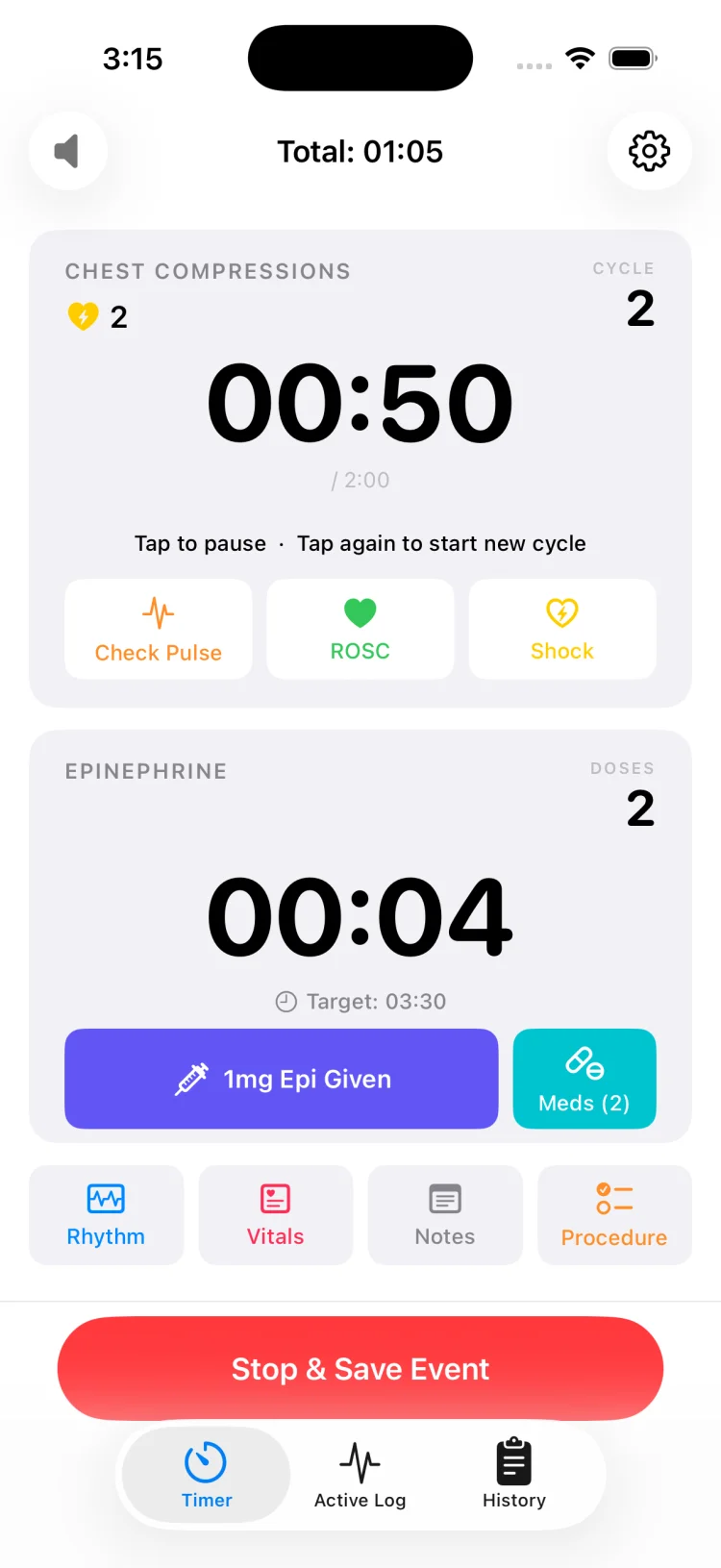
This is the category where MedCode sits. The defining characteristics: multiple simultaneous timers for the compression cycle and epinephrine interval, one-tap logging for medications, rhythms, shocks, and procedures, automatic timestamping with both clock time and elapsed offset, and an exportable timeline at the end. The trade-off is that it requires a download, some degree of familiarity, and reliance on a single device. The app is the right choice when you want the clock and the record in the same place, when your institution permits phone-based documentation, and when you have time to practice using it before you need it in a real code.
The privacy question: where does the data go?
Anything touching a real resuscitation event deserves a hard look at where the data goes, who sees it, and what happens to it after the session ends. This is not hypothetical. The session contains timestamps, medications, rhythms, procedures, and vitals. If that data is transmitted to a server, stored in a cloud account, or processed by an analytics service, you need to know.
Account requirements and cloud sync
Some apps require an account to function. The stated reason is usually to enable sync across devices or to back up session data. The unstated consequence is that your session data now lives on someone else's server, subject to their security practices, their data retention policies, and their terms of service. If the app requires an account, ask where the data is stored, how long it is retained, who has access to it, and whether it is encrypted at rest and in transit. If the privacy policy does not answer these questions clearly, treat the app as if it sends everything.
Analytics and tracking SDKs
Many free apps include analytics frameworks to track user behavior, measure engagement, and report crashes. These SDKs phone home every time you open the app, start a session, or log an event. The data is typically anonymized and aggregated, but anonymization is imperfect and aggregate data can still reveal patterns. An app used in a clinical environment should not be transmitting usage data to a third-party analytics service. If the app includes Google Analytics, Firebase, Mixpanel, or similar tracking, the data is leaving the device whether you consented to it or not.
What on-device actually means
An app that works entirely on-device has no account, no cloud sync, no server dependency, and no analytics SDK. The session data is stored locally on the phone and never leaves it unless you explicitly export a PDF and share it yourself. This is the strongest privacy guarantee an app can make. MedCode works this way. Sessions are saved to the device, and the only time data leaves the phone is when you generate a PDF and use the phone's share sheet to send it somewhere. No network call, no cloud service, no tracking.
Why this matters even for mock codes
Some people assume privacy only matters for real codes with real patient data. This is incorrect. Even a mock code session logged in a simulation lab contains information about your institution's practices, your team's performance, and the medications and protocols you use. That information has value. If an app is transmitting mock code data to a server, it is learning about your institution whether you intended to share that or not. The privacy standard should be the same for training as it is for real events. See the mock code simulation guide for more on this.
Where MedCode sits against those criteria
This is the honest accounting. MedCode is a purpose-built code blue timer for iPhone and Android. It was designed for the recorder role: one person holding a phone, watching the room, tracking two timers, and logging events as they happen. Here is what it does and how it maps to the criteria above.
Readability and layout
Both timers are visible on one screen with no scrolling or tab switching. The compression cycle timer and the epinephrine interval timer each occupy half the screen, with numerals sized for readability at arm's length. High contrast, no gray-on-white text. The session clock and event count are persistent at the top. The layout does not change during the session, so muscle memory works.
Tap efficiency
Medications, rhythms, shocks, and procedures are each one tap from the main screen. The medication list contains 30 drugs, each with a reference concentration label and an adjustable stepper, so recording an administration the team has already decided on is a tap on the drug name and a stepper set to the amount that was given. Rhythms are one tap from a list of nine options including VF, pulseless VT, PEA, and asystole. Procedures are one tap from a list of eleven interventions covering airway, access, and electrical therapy. Vitals require value entry, so they take more than one tap, but the fields are accessible without navigating away from the timer screen.
Multi-interval tracking
The compression timer alerts at two minutes for the rhythm and pulse check, then resets. The epinephrine timer alerts at a configurable interval from zero to 10:45 in fifteen-second steps, defaulting to 3:30. Both timers run simultaneously. Both can be reset independently without affecting the other or the session clock. The alerts are audible over the silent switch and repeating haptics until acknowledged. This addresses the interval-tracking problem covered in the epinephrine timing guide.
Record generation
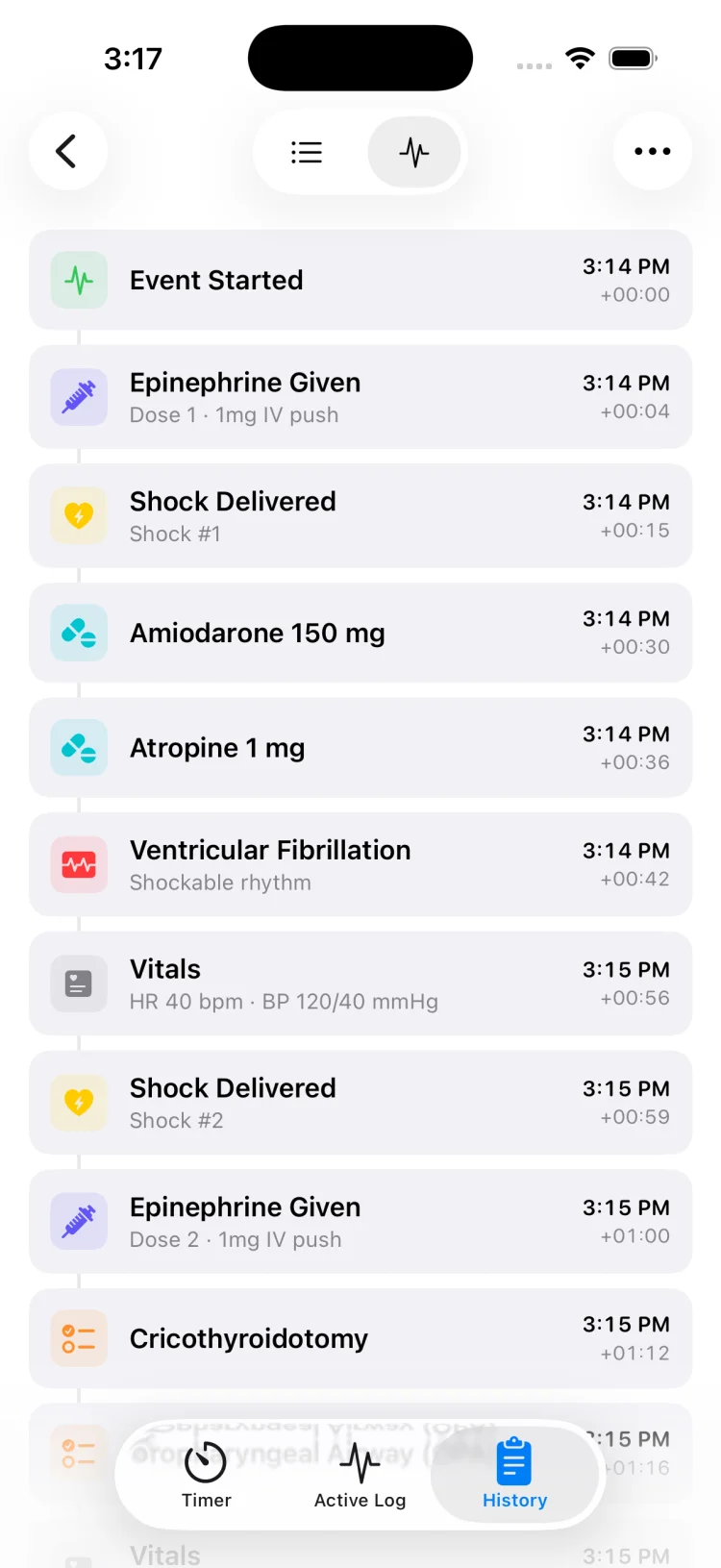
Every logged entry carries both clock time and elapsed offset from the start of the session. The live timeline is visible during the event, so the recorder can scroll back to answer questions like "how long since the last epi?" without interrupting the flow. When the session ends, it saves to on-device history. The session can be exported as a PDF in two formats: a full chronological timeline listing every event with timestamps, or a summary report grouping medication totals, shocks delivered, and rhythms observed. The PDF is shareable through the phone's share sheet for printing, emailing, or filing per institutional policy.
Privacy and data handling
MedCode has no account, no login, no cloud sync, and no analytics SDK. Sessions are stored on the device and nothing leaves it unless you export a PDF and share it yourself. The app does not ask for a patient name or identifier. Sessions are identified by date and time. There is no network call in the timing path, no server dependency, and no tracking. The strongest privacy guarantee the app can make is that it does not transmit anything, and that is the guarantee it makes.
Offline reliability
MedCode works entirely offline. You can start a session, log events, run timers, and export a PDF in a basement radiology suite with no Wi-Fi, in an ambulance bay with no signal, or in a hospital with the network down. There is no loading state, no connectivity check, no server call. The app behaves the same whether the phone has five bars or zero.
Pricing
MedCode is free to try for 30 days or 5 codes, whichever comes first, with every feature included. After the trial, a one-time $6.99 unlock keeps it working. No subscription, no pro tier, no ads, and future updates come with the app. You try it on real mock codes, then buy it once.
Using MedCode as the event timer
Start the session, track both intervals, and export the timeline when it ends:
- Open MedCode and tap Start Event. The session clock begins and both the compression cycle timer and epinephrine interval timer start running.
- Watch the timers. The compression timer alerts at two minutes for the rhythm check. The epinephrine timer alerts at the interval you configured in settings.
- Log events with one tap: medications from the med list, rhythms from the rhythm list, shocks and procedures from their respective screens. Each entry timestamps automatically.
- End the session when resuscitation is complete. The session saves to on-device history with a full timeline.
- Export a PDF as a timeline report or summary report, then share it through the phone's share sheet to print, email, or file per your institution's policy.
What MedCode deliberately does not do
An honest evaluation includes the limits. Here are the things MedCode does not do, stated as facts rather than apologies, so you know what you are not getting.
No EHR integration
MedCode does not connect to an electronic health record system. The exported PDF is a standalone document. If your institution requires code documentation to be entered directly into the EHR during the event, MedCode is not the right tool. The PDF can be attached to the chart after the fact, but there is no live sync, no automatic upload, and no API connection to institutional systems.
No monitor or defibrillator connection
MedCode does not connect to bedside monitors, defibrillators, or other medical devices. It does not pull vitals automatically, does not receive shock notifications, and does not log rhythm changes from a connected monitor. Everything is entered manually. If your workflow depends on automatic data capture from connected devices, MedCode is not a replacement for that. It is a timer and a logging tool, not a device integration layer.
No multi-device sync
Sessions live on the device where they were created. There is no cloud sync, no shared session across multiple phones, and no way for two people to log events to the same timeline from different devices. One phone, one recorder, one session. If your team needs collaborative documentation from multiple devices simultaneously, MedCode does not support that.
Built-in medication pick-list, no dose calculator
MedCode includes a pick-list of 30 critical-care medications organized in 8 categories, each with a reference concentration label and an adjustable stepper for logging the amount given. The app does not calculate doses based on patient weight, does not recommend a medication, does not check for interactions or allergies, and does not provide dosing guidance. The medication list is a data-entry convenience for logging administrations the team has already decided on. Every clinical decision stays with the team. MedCode is a documentation tool, not clinical decision support.
No team collaboration features
MedCode is designed for one person: the recorder. It does not include role assignment, team chat, shared checklists, or multi-user access. If your team uses a collaborative platform where multiple people contribute to the documentation in real time, MedCode is not a substitute for that platform.
Phones only
MedCode runs on iPhone (iOS 18.6 or later) and Android phones (Android 8 or later). There is no web version and no desktop version. If you need the timer on a shared workstation or a monitor in the room, MedCode will not work for you.
When a purpose-built app is the wrong choice
Not every environment benefits from a phone-based code timer. Here are the scenarios where a purpose-built app introduces more problems than it solves.
Institutional policy mandates a specific paper form
Some hospitals require a specific paper code sheet to be completed during the event, signed by the team leader, and filed in the patient record as the legal documentation of the resuscitation. If that is your institution's policy, the app is supplemental at best. You might use it to track intervals and export a timeline for debriefing, but the paper form is the record of care. Adding a second documentation method doubles the work without replacing the mandated form.
Integrated defibrillator-recorder workflow
Some resuscitation systems integrate the defibrillator event log with the electronic medical record or a dedicated code documentation platform. The defib logs shocks, rhythms, and compression pauses automatically, and that log becomes the institutional source of truth. If your workflow is built around that integration, a separate phone app fragments the documentation and introduces a second timeline that has to be reconciled with the defib log afterwards.
Personal phones prohibited at the bedside
Some institutions prohibit personal phones in patient care areas for infection control, privacy, or policy reasons. If personal devices are not permitted at the bedside during a code, you cannot use a phone-based timer. The policy overrides the tool. In these environments, the institutional standard is the only option, whether that is a paper sheet, a bedside computer, or a dedicated timer device.
The recorder is unfamiliar with the app
If the person assigned to the recorder role has never opened the app before, the middle of a real code is not the time to learn it. An unfamiliar interface under pressure leads to errors, missed entries, and frustration. The app is only useful if the recorder has practiced with it during mock codes and knows the layout, the tap sequences, and the workflow by muscle memory. Without that familiarity, the paper sheet or the stopwatch is the safer choice.
The team has an established workflow that works
If your team already has a documentation workflow that produces complete, accurate records and everyone knows their role, changing the workflow introduces risk. The benefit of a new tool has to outweigh the cost of retraining the team and the possibility of errors during the transition. If the current system works and the team is satisfied with it, there is no reason to replace it.
How to trial a code blue timer honestly
Do not use a code blue timer for the first time during a real code. The trial happens in a controlled environment where failure is cheap and feedback is immediate. Here is how to evaluate whether an app will actually work for your team.
Run it during a mock code
The best test of a code timer is a mock code. Assign the recorder role to someone on the team, hand them the phone with the app open, and run a simulated resuscitation. Time the compression cycles, call for medications, log shocks, and track the epinephrine interval. See whether the recorder can keep up without slowing the team. See whether the alerts are audible in a noisy room. See whether the exported timeline matches what actually happened. If the app fails in a mock code, it will fail in a real one.
Compare the exported record to your institutional standard
After the mock code, export the timeline and compare it to the paper code sheet your institution uses. Does the exported PDF contain all the same information? Are the timestamps accurate to the minute? Are there fields on the institutional form that the app does not capture? If the exported timeline is incomplete or does not match the format required by policy, the app cannot replace the institutional standard. It can supplement it, but not replace it.
Test offline functionality in a realistic environment
Put the phone in airplane mode and run a session. Does the timer still work? Can you still log events? Can you still export a PDF? If the app requires connectivity for any part of the workflow, you will discover it here. The app should behave identically with no signal. If it does not, it is not reliable for use in basements, stairwells, or hospitals with unreliable Wi-Fi.
Have multiple people use it and give honest feedback
Different people on the team will have different comfort levels with phone apps, different hand sizes, different visual acuity. Let several people trial the app during separate mock codes and collect their feedback. If one person loves it and three people struggle with the tap targets or the layout, the app is not a good fit for the team. The tool has to work for the majority, not just the early adopters.
Debrief with the exported timeline and see if it changes the conversation
The value of a code timer is not just the timer. It is the record. After the mock code, run a debrief using the exported PDF as the timeline. Does it clarify the sequence of events? Does it reveal pause durations or interval drift that would have been missed with a paper record? Does it make the debrief more objective and less reliant on recall? If the timeline does not change the quality of the debrief, the app is adding work without adding value. This process is covered in depth in the code blue debriefing guide.
MedCode is a documentation tool, not clinical decision support
MedCode is a timer and documentation tool for resuscitation events. It is not clinical decision support and is not a medical device. It does not recommend a medication, a dose, an interval, a rhythm interpretation or a next step. Medication entries exist so that administrations your team has already decided on can be recorded in one tap, with automatic timestamping.
All clinical decisions remain with the team and should follow your local protocol and current resuscitation guidelines. MedCode is not intended for diagnosis or treatment. The exported record is a documentation artifact and should be reviewed, edited and filed in accordance with your institution's policy.
MedCode is a practice and training tool. It is not a medical device, not clinical decision support, and not a substitute for your institution's required documentation or protocol. Any use during a real event is the individual clinician's own professional judgement.
Frequently asked questions
What is the difference between a stopwatch and a code blue timer?
A stopwatch runs one clock. A code blue timer runs the recurring intervals of a resuscitation event: the compression cycle, which alerts at two minutes for the rhythm and pulse check, and the epinephrine interval, which alerts at the dose interval your team is using. A stopwatch tells you how long the event has been running. A code timer tells you when the next action is due and logs what happened in between. The stopwatch is better than nothing. A purpose-built timer is better than a stopwatch.
Should I use the phone stopwatch or a dedicated code timer app?
The phone stopwatch works if all you need is elapsed time and you are tracking intervals in your head or on paper. It fails when you need to track two intervals at once, log events as they happen, or hand off a record afterwards. A dedicated code timer runs multiple clocks simultaneously, timestamps every entry automatically, and produces a timeline you can export when the event ends. Use the stopwatch if it is already in your hand and the code is happening now. Use a purpose-built timer if you have thirty seconds to open an app and want the documentation finished when the code is.
Can a code blue timer app replace the paper code sheet?
In most environments, yes, if your institution permits it. A purpose-built timer captures the same information as a paper code sheet with better timestamp accuracy and less transcription error. The exported PDF can be printed, filed, or attached to the patient chart per institutional policy. The timer does not replace the paper sheet in environments where policy mandates a specific paper form, where personal phones are prohibited at the bedside, or where the defibrillator already logs the event and that log is the institutional standard. Check your local policy before relying on an app as the sole documentation method.
What should I look for in a code blue timer app privacy policy?
Look for explicit statements about data handling: does the app require an account, does it sync to a cloud service, does it transmit any session data, and does it include analytics or tracking SDKs. The strongest privacy guarantee is an app that works entirely on-device with no account, no cloud dependency, and no network calls in the timing or logging path. Anything touching a real resuscitation event deserves a hard look at where the data goes and who controls it. If the privacy policy is vague or missing, treat the app as if it sends everything.