Rhythm at each check is the entry most often logged once and never updated. Many resuscitation records show the presenting rhythm and the final rhythm, but nothing in between, even though the rhythm may change at each two-minute check. This page documents how MedCode's rhythm picker and shock logging work, why capturing the rhythm sequence makes the timeline readable afterwards, and how to review that sequence in a mock code debrief.
The short version
MedCode provides a 9-option rhythm picker and shock logging that records a sequential shock number and timestamp. Rhythm at each check can be logged with a single tap, creating a timestamped history. The timeline shows what was logged, when, and what changed between checks, making the record readable in a debrief. MedCode is designed for practice, training and mock codes. It does not interpret rhythms or recommend treatment.
Rhythm categories as terminology only
Arrest rhythms are conventionally grouped into two categories: shockable rhythms (ventricular fibrillation and pulseless ventricular tachycardia) and non-shockable rhythms (pulseless electrical activity and asystole). MedCode uses this terminology because it matches what is taught in ACLS and what appears in resuscitation algorithms. The app's rhythm picker provides these labels because they are what clinicians expect to see.
Recognising and acting on a rhythm is a clinical skill taught in ACLS and at the bedside, not something this page or the app teaches or performs. MedCode does not interpret the rhythm on the monitor, does not tell you whether a rhythm is shockable, and does not recommend whether to shock. It provides a picker with the labels you expect so rhythm entries can be logged quickly during a mock code or training session.
Why the rhythm history matters for the record
In many resuscitation records, rhythm is logged at the start and then never updated. The record shows VF at time zero and asystole at twenty minutes, but it does not show when the conversion happened, how many shocks were delivered before the conversion, or whether the rhythm was ever PEA. This gap makes it difficult to reconstruct what happened during quality review or debrief a mock code effectively.
What gets missed when rhythm is not logged at each check
Without rhythm logged at each check, the record cannot answer basic questions: Did the rhythm stay shockable for six cycles and then convert? Did asystole convert after the second dose of epinephrine? Was there ever a pulse check that showed organised activity? The rhythm history tells the story of the electrical evolution of the event, and that story is lost if rhythm is not captured at every check.
Shock count and timing as reportable metrics
Many registry reports and quality reviews ask for shock count and timing. The record should show how many shocks were delivered, at what times, and what the rhythm was before and after each shock. A note that says "3 shocks delivered" without timestamps or rhythm context cannot be used to calculate intervals or assess effectiveness. Logging shocks as discrete numbered events with timestamps makes that data available.
The 9-option rhythm picker in MedCode
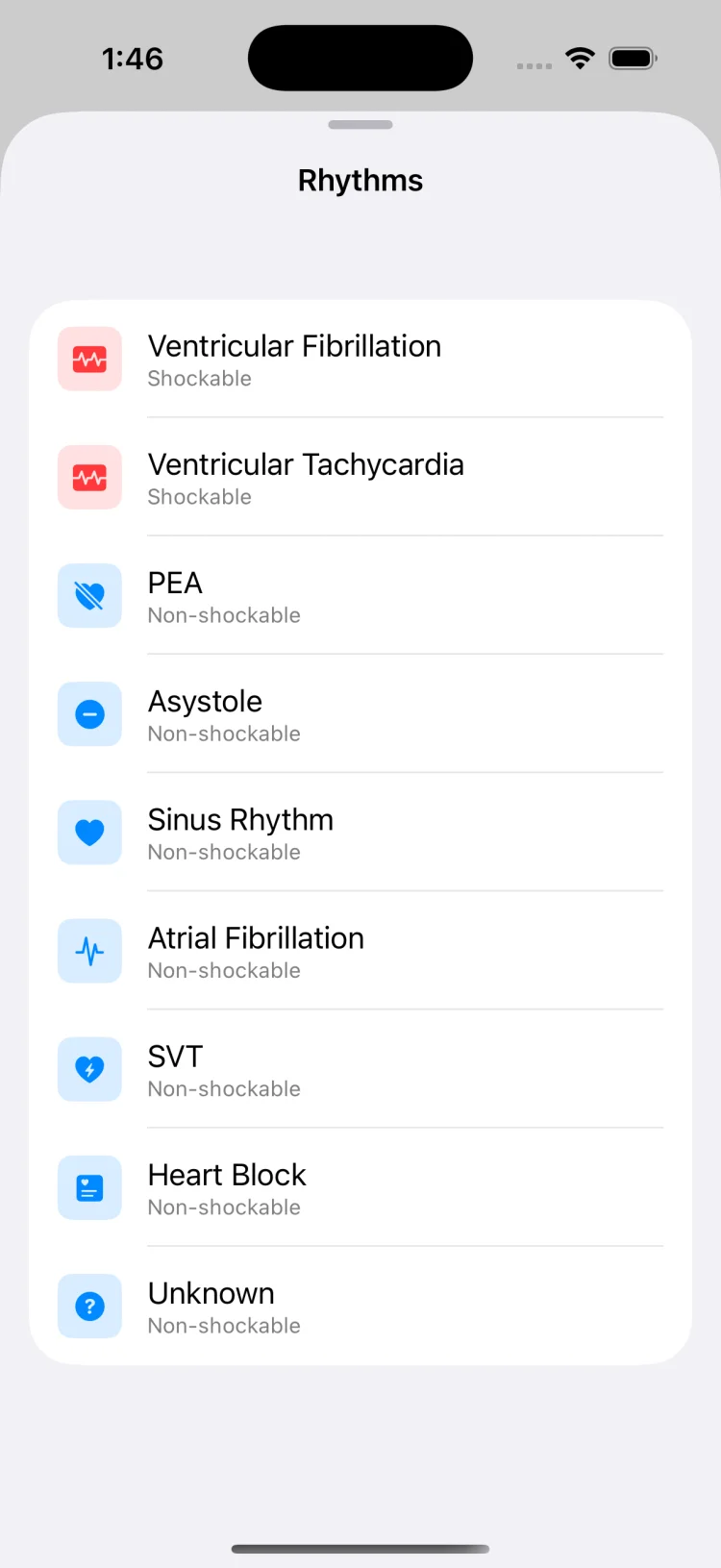
MedCode provides exactly 9 rhythm options: Ventricular Fibrillation, Ventricular Tachycardia, PEA, Asystole, Sinus Rhythm, Atrial Fibrillation, SVT, Heart Block, and Unknown. These labels reflect the terminology used in resuscitation training. The app does not interpret the rhythm; it logs whichever option the user taps, timestamped to the session clock.
Why nine options
The picker includes the four arrest rhythms plus five additional rhythms that may appear during or after resuscitation. Sinus Rhythm is logged when there is return of spontaneous circulation. Atrial Fibrillation, SVT and Heart Block may appear during post-resuscitation monitoring. Unknown is available for situations where the rhythm is not immediately identifiable or the user prefers not to commit to a specific label during a fast-moving training scenario.
What the app does not do
MedCode does not connect to monitors or defibrillators. It does not read the rhythm from the monitor and suggest what to select. It does not tell you whether a rhythm is shockable or what to do about it. It simply provides a picker with the labels clinicians expect, so the observed rhythm can be logged quickly and appear on the timeline with a timestamp.
Logging shocks as discrete numbered events
Shock logging in MedCode records a sequential shock number and a timestamp. The app does not record or suggest a joule setting, does not connect to a defibrillator, and does not tell the user whether to shock. When the user taps the shock log button, the app increments the shock counter and timestamps the event to the session clock.
Sequential numbering
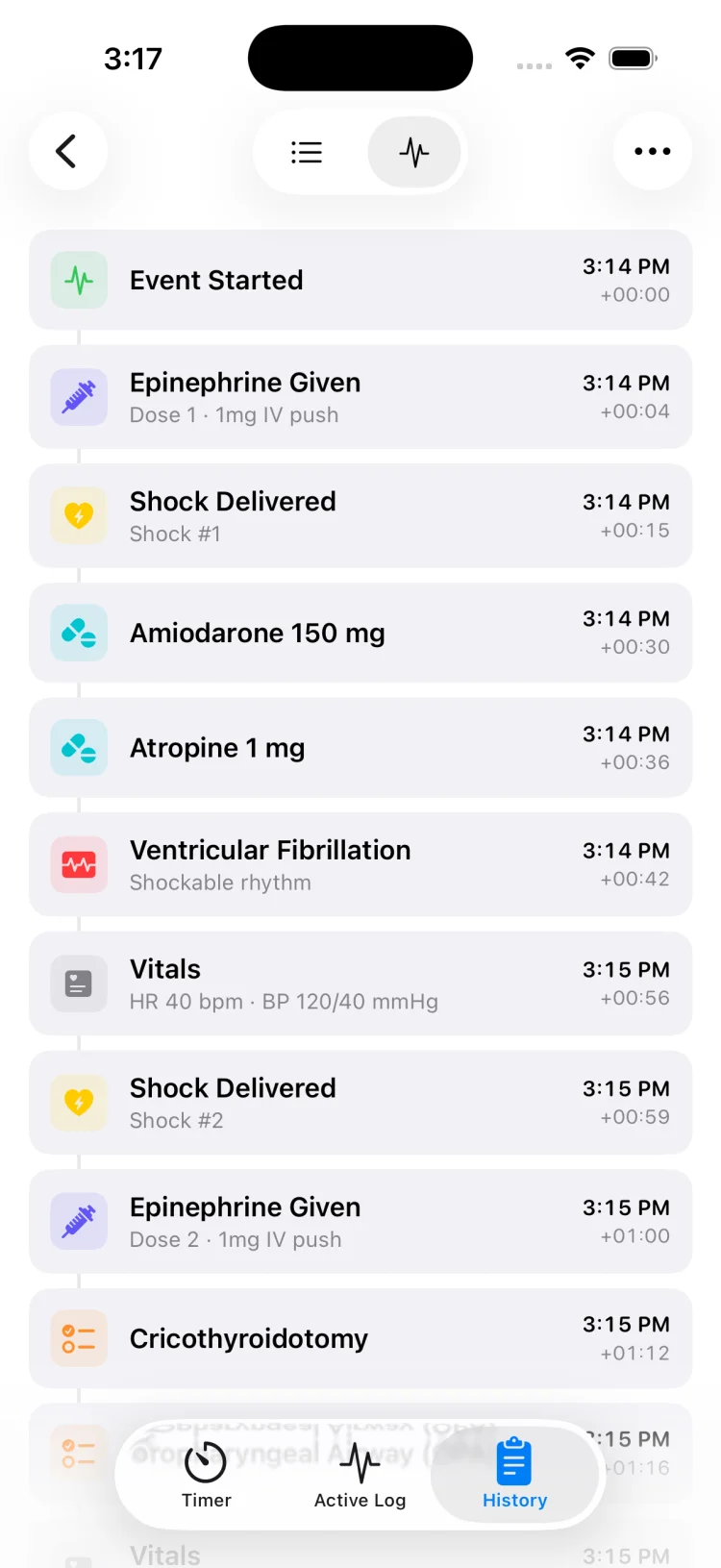
Each shock is logged as Shock 1, Shock 2, Shock 3, and so on. The numbering resets at the start of each new session. The shock entry appears on the live timeline alongside rhythm and medication entries, making it possible to see the sequence of what was logged and when. This makes it straightforward to count total shocks and see the intervals between them in the exported timeline.
What is not captured
MedCode does not ask for or record joule settings, does not capture whether the shock was biphasic or monophasic, and does not log the make or model of the defibrillator. It captures only that a shock event occurred and when. The clinical decision about whether to shock, at what energy, and with what device remains entirely with the team and should follow institutional protocol.
Reviewing the rhythm and shock sequence in a mock code debrief
After a mock code or training session, the exported timeline shows every rhythm entry and shock event in sequence with timestamps. This makes it possible to review what was logged, when, and how the rhythm changed over the course of the scenario. The timeline is readable because each entry is timestamped to the session clock and appears in chronological order.
Questions the timeline can answer
Was rhythm logged at every check or only at the start? How long did the rhythm stay shockable before converting? How many shocks were delivered and at what intervals? Did the rhythm convert after a shock or between checks? Was there a pattern to the rhythm changes? These questions are answerable from the timeline if rhythm and shocks were logged consistently during the scenario.
Using the timeline for feedback
In a debrief, the timeline provides objective data about what was logged and when. It does not interpret whether the team made the right call; it shows what the team logged. This makes it a useful discussion aid for training: the team can see whether they captured the rhythm at each check, whether shock timing matched the scenario design, and whether the record would be readable if reviewed later.
What gets captured in the session timeline and PDF export
Every rhythm entry, shock event, medication, procedure and vital logged during the session appears on the live timeline with a timestamp. The session clock starts when the user starts the session, and every entry carries an elapsed offset from time zero. When the session ends, the timeline can be exported as a PDF summary that shows the complete sequence in chronological order.
On-device storage, no cloud sync
All session data is stored on-device. MedCode does not use cloud storage, does not require an account, and does not upload session data anywhere. Sessions remain on the device until the user deletes them. The PDF export is generated locally and can be shared via the phone's share sheet if the user chooses to do so.
What the timeline includes
The timeline shows rhythm entries, shock events, medications logged from the 30-medication pick-list, procedures logged from the 11-procedure list, vitals, and free-text notes. Each entry includes the elapsed time from session start and the clock time. The exported PDF presents this data in a table format with columns for time, event type, and details, making it readable as a chronological summary of what was logged.
Using rhythm logging in MedCode during a mock code
MedCode is designed for practice, training and mock codes. During a training scenario, rhythm can be logged at each check with a single tap. Each entry is automatically timestamped with both clock time and elapsed time from the start of the session. The rhythm appears on the live timeline immediately, making the rhythm history visible during the scenario and readable afterwards in a debrief.
Logging rhythm and shocks in MedCode
Capture the rhythm sequence so the timeline is readable in a debrief after a mock code or training session:
- Start a session when the training scenario begins. The session clock starts and every entry from this point carries an elapsed offset from time zero.
- At each rhythm check, open the rhythm picker and tap the observed rhythm from the 9 options: VF, VT, PEA, Asystole, Sinus, AFib, SVT, Heart Block, or Unknown.
- If a shock is delivered in the scenario, tap the shock logging button. The app increments the shock counter and timestamps the event. The shock entry appears on the timeline alongside rhythm entries.
- Scroll the live timeline to see the rhythm and shock history at a glance. This shows what has been logged and when during the scenario.
- When the scenario ends, export the session as a PDF. The exported timeline shows every rhythm entry and shock event with timestamps, creating a chronological summary for the debrief.
MedCode does not interpret rhythms or recommend treatment
MedCode is a timer and documentation tool for resuscitation events. It is not clinical decision support and is not a medical device. It does not interpret the rhythm on the monitor, tell you whether a rhythm is shockable, or recommend whether to shock. Rhythm interpretation is a clinical skill taught in ACLS and at the bedside, not something a web page or an app can substitute for.
Rhythm logging in MedCode exists so the rhythm observed by your team can be recorded with one tap, timestamped automatically. The clinical decision about what rhythm you are looking at and what to do about it remains with the team and should follow your institution's protocol and current resuscitation guidelines. MedCode is not intended for diagnosis or treatment.
MedCode is a practice and training tool. It is not a medical device, not clinical decision support, and not a substitute for your institution's required documentation or protocol. Any use during a real event is the individual clinician's own professional judgement.
Frequently asked questions
What are the 9 rhythm options in MedCode's picker?
MedCode provides exactly 9 rhythm options: Ventricular Fibrillation, Ventricular Tachycardia, PEA, Asystole, Sinus Rhythm, Atrial Fibrillation, SVT, Heart Block, and Unknown. These labels reflect the conventional terminology used in resuscitation training and match the language clinicians use at rhythm checks. The app does not interpret the rhythm on the monitor or tell you which option to select; it simply logs whichever rhythm the user taps, timestamped to the session clock.
Why does the rhythm picker group rhythms into shockable and non-shockable categories?
Arrest rhythms are conventionally grouped into two categories: shockable rhythms (VF and pulseless VT) and non-shockable rhythms (PEA and asystole). MedCode uses this terminology because it matches what is taught in ACLS and what appears in resuscitation algorithms. Recognising and acting on a rhythm is a clinical skill taught at the bedside, not something the app performs. MedCode does not interpret rhythms or recommend treatment; it simply provides a picker with the labels clinicians expect so rhythm entries can be logged quickly during practice or training scenarios.
How does shock logging work in MedCode?
Shock logging in MedCode records a sequential shock number and a timestamp. The app does not record or suggest a joule setting, does not connect to a defibrillator, and does not tell the user whether to shock. When the user taps the shock log button, the app increments the shock counter and timestamps the event to the session clock. The shock entry appears on the live timeline alongside rhythm and medication entries, making it possible to see the sequence of what was logged and when during a mock code or training session.
Why is rhythm at each check the entry most often logged once and never updated?
In many resuscitation records, rhythm is logged at the start of the event and then never updated, even though the rhythm may change at each two-minute check. This means the record shows the presenting rhythm and the final rhythm, but nothing in between. MedCode is designed so that rhythm can be logged at every check with a single tap, creating a timestamped history of rhythm changes. This makes the timeline readable afterwards in a mock code debrief and captures the sequence of what was logged, when, and what changed between checks.